Rowin Mol · October 16, 2026 · (last month) · updated Nov 19
In short
You rarely plan a wedding alone, and not everyone who helps needs access to everything. From now on you can invite your partner, master of ceremonies (ceremoniemeester), witness or wedding planner to BruiloftBuddy, and decide per person what they see.
Short answer:
Below you can first read why we built this and then how it works. Want to invite someone straight away? Go to How do you invite someone?. Mainly unsure about who gets which role? Then read Which role do you give to whom?
Our two masters of ceremonies came on board early. The venue was booked, the save the dates and invitations had been sent, and then we discussed with them who would do what. But they weren't in BruiloftBuddy. Back then BruiloftBuddy was still mainly the RSVP for our own guests, so they worked in their own Excel sheets.
We kept track of a lot ourselves, because we enjoyed it. Even so, more and more ended up with our masters of ceremonies as the day got closer. That happened gradually, over months. And all that time they were working in different lists from ours.
With Plan together, everyone who helps plan works in the same planning, each with their own account and a role that fits their task. You could of course already share your password, but then your master of ceremonies could also see your budget. And if you later wanted someone out again, you had to change your password. If you remove someone now, it only affects that one person.
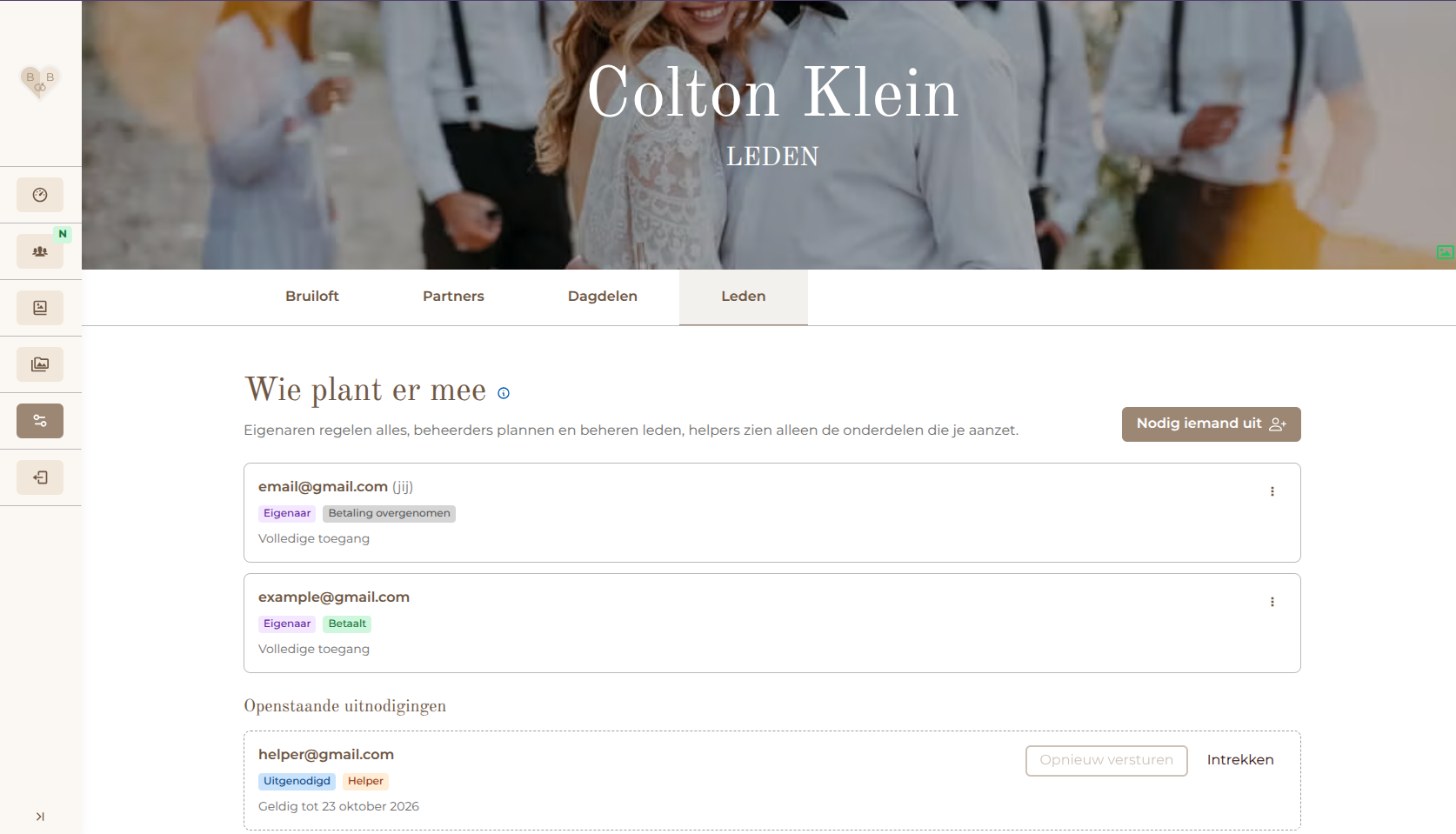
Only Owners and Managers can see the Members tab. If you are an Owner or Manager, this is how it works:
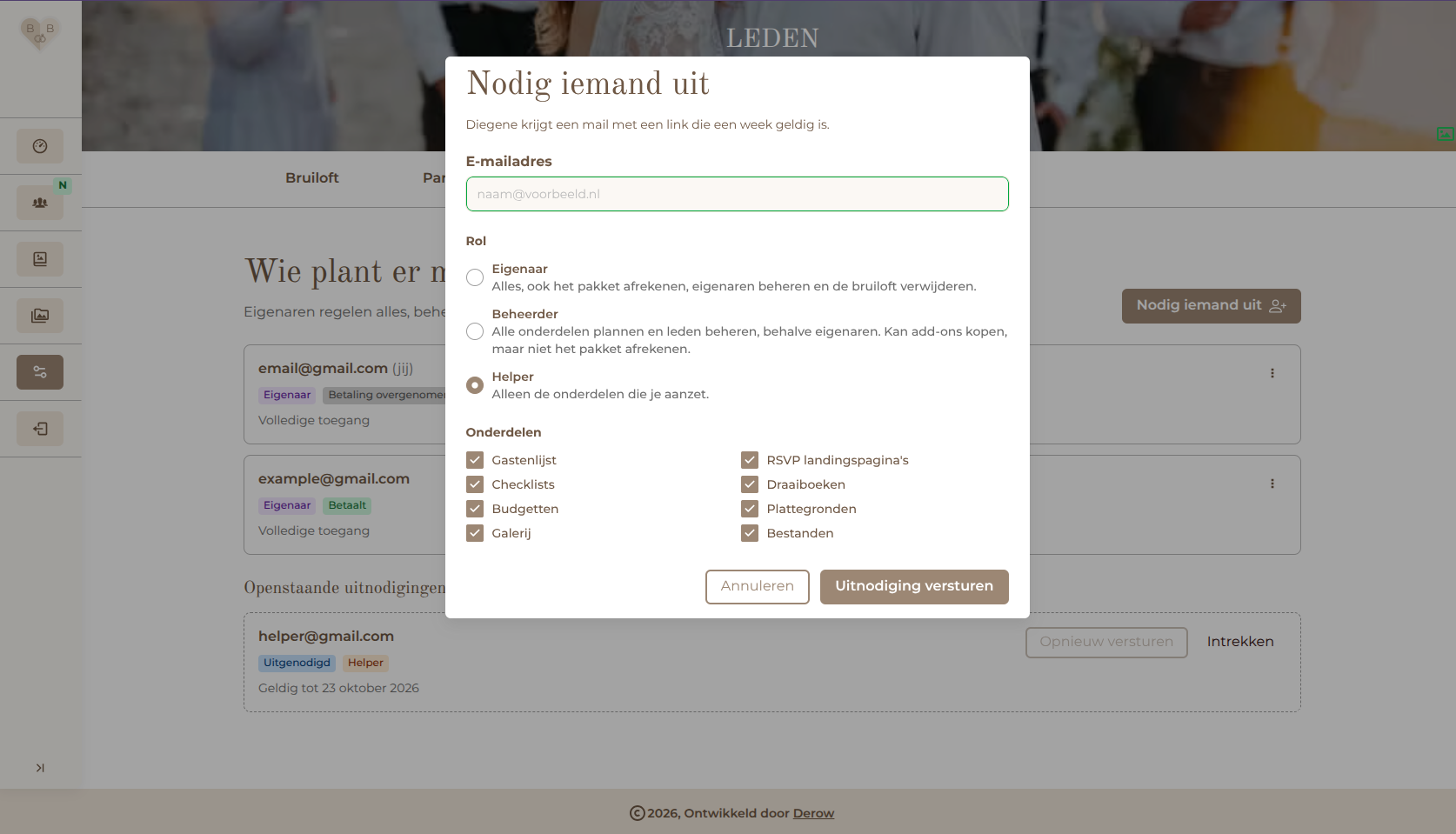
The invite arrives by email and is valid for seven days. If it has been left unopened, you can send it again after 24 hours. It is then valid for another seven days. Whoever opens the link creates an account with the email address that is already filled in, or logs in with an existing account.
You will also find "Invite a member" as a step in Getting started on your dashboard.
There are three roles, and you choose one per person. You can change a role later.
Owner. Can do everything, including paying for the plan, managing owners and deleting the wedding. This is the role for the two of you: invite your partner as an Owner and you both have the same rights. Only an Owner can make someone else an Owner.
Manager. Plans every section with you and manages the members, except the Owners. Can buy add-ons, but cannot pay for the plan. This suits a wedding planner, or a parent who takes on a large part of the organisation.
Helper. Only sees the sections you switch on. This is the role for someone who helps with a few things: your master of ceremonies, a witness, or the friend doing the seating plan. You can also invite a supplier this way, for example your photographer to the wedding day timeline only.
Not sure? Start with Helper and only switch on what is needed now. You can always switch on more sections later. Taking something away from someone often feels more awkward.
One limitation is worth knowing in advance: an account belongs to one wedding. If your wedding planner or photographer is already helping another couple plan with their account, they cannot join yours with that same account. Switching between several weddings from one account is on our roadmap. We can't say yet when it will arrive.
A Helper only sees what you switch on. You choose from the guest list, invitation pages, checklists, wedding day timelines, budgets, floor plans, the gallery and files.
A few examples:
If you move a time in the wedding day timeline, your master of ceremonies sees the new time as soon as they open BruiloftBuddy. Nobody has to send round a new version any more, and a separate Excel sheet on the side, like our masters of ceremonies had, is no longer needed. Why that makes such a difference is covered in sharing your wedding day timeline with your master of ceremonies and suppliers.
The plan belongs to your wedding. Everyone you invite plans within it and pays nothing themselves. You can see which plans are available on pricing.
Whoever pays for the plan stays an Owner. If you have a subscription, another Owner can take over payment. They only start paying from the end of the current period, so nothing is ever paid twice. Handy if the subscription is currently in one of your names and you want to change that later. With a one-off plan there is nothing to take over.
The Members tab shows who is part of your wedding and with which role. Invites that are still open are shown there too.
As an Owner you get an email as soon as anything changes in who is planning with you. For example when someone gets a different role, is removed or leaves, or when ownership is transferred or payment is taken over. If someone gets a different role or is removed, that person gets an email too. A Helper who is done can leave the wedding themselves through Account settings, "Leave wedding".
If someone changes something in the planning itself, you don't get an email or notification about it. So agree who keeps track of what, for example that only the master of ceremonies moves times in the wedding day timeline and lets you know when something changes. We had that conversation about dividing the tasks early on with our masters of ceremonies, and we recommend you do the same.
Already using BruiloftBuddy? You will now find the Members tab in Wedding settings. Just starting out? You can try BruiloftBuddy free for seven days. Planning together is included in the free trial too, so you can invite your partner straight away and work in the same planning from day one. The people you invite pay nothing themselves.

Rowin Mol
Rowin Mol is the founder of BruiloftBuddy. He got married in 2024 and, while planning his own wedding, found that on top of the tools he was using he still needed a separate spreadsheet for the guest list, attendance and the wedding day timeline.
Out of that frustration he built BruiloftBuddy: the platform he wished he'd had himself.
Try it yourself
Build your own wedding website
The editor on the homepage is the real editor, not a video. You see what you're making straight away.
Open the editorRowin Mol
Rowin Mol is the founder of BruiloftBuddy. He got married in 2024 and, while planning his own wedding, found that on top of the tools he was using he still needed a separate spreadsheet for the guest list, attendance and the wedding day timeline.
Out of that frustration he built BruiloftBuddy: the platform he wished he'd had himself.
Try it yourself
Build your own wedding website
The editor on the homepage is the real editor, not a video. You see what you're making straight away.
Open the editorYes. Invite your partner via Wedding settings, Members tab, and choose the Owner role. Your partner then has their own login and the same rights as you.
Open the link in the email within seven days. Create an account with the email address that's already filled in, or log in if you already have an account. You don't pay anything yourself. If the link has expired, ask them to send it again. As a Helper, you can leave the wedding yourself later via Account settings, "Leave wedding".
No. The plan belongs to the wedding, and everyone you invite plans along within it.
No. Emails only go out when something changes in who is planning along, such as a new role or someone leaving. Whatever you change in the planning itself, the others see when they open BruiloftBuddy.
Not yet. An account belongs to one wedding. Switching between several weddings from one account is on our roadmap, but there's no date for it yet.


