
See every update and improvement to BruiloftBuddy. From new features to bug fixes, we keep you posted on everything that changes.
BruiloftBuddy is constantly being developed. Not with big quarterly releases, but with small, well-considered steps. A bug fix here, a new feature there, an improvement based on what users tell us. On this page we keep track of it all, so you always know what has changed and what to expect. Found something that isn't right, or missing something? Let us know via the contact page.


November
- Minor
Not every family member coming to everything? You can set that right when you add them. And in the website builder you find the block you need with just a few letters.
What's better:
November
- Minor
Getting married abroad, or are your guests coming from further away? BruiloftBuddy now adapts to your wedding: which currency you count in, which time zone you marry in and how amounts, dates and times look.
What you can do:
November
- Minor
Your guests now see clearly what happens with their details. And they only share dietary wishes and allergies if they agree to it themselves.
What's better:
November
- Minor
Working on the same wedding day schedule together, for example with your partner or master of ceremonies? Nothing gets lost anymore when you both make changes at the same time.
What's better:
November
- Minor
We've updated the budget calculator with current Dutch prices, so the first split of your budget is closer to what a wedding really costs.
What's better:
November
- Major
Are you inviting guests from abroad, or would you simply rather plan in English? Now you can. You choose the language you use the app in, and your guests see their pages in the language you choose.
What you can do:
November
- Major
Choose the events of your wedding day, put them in the right order and BruiloftBuddy works out the times for you, including travel time and turning the room around. Then fine-tune each moment until it's just right.
What you can do:
November
- Major
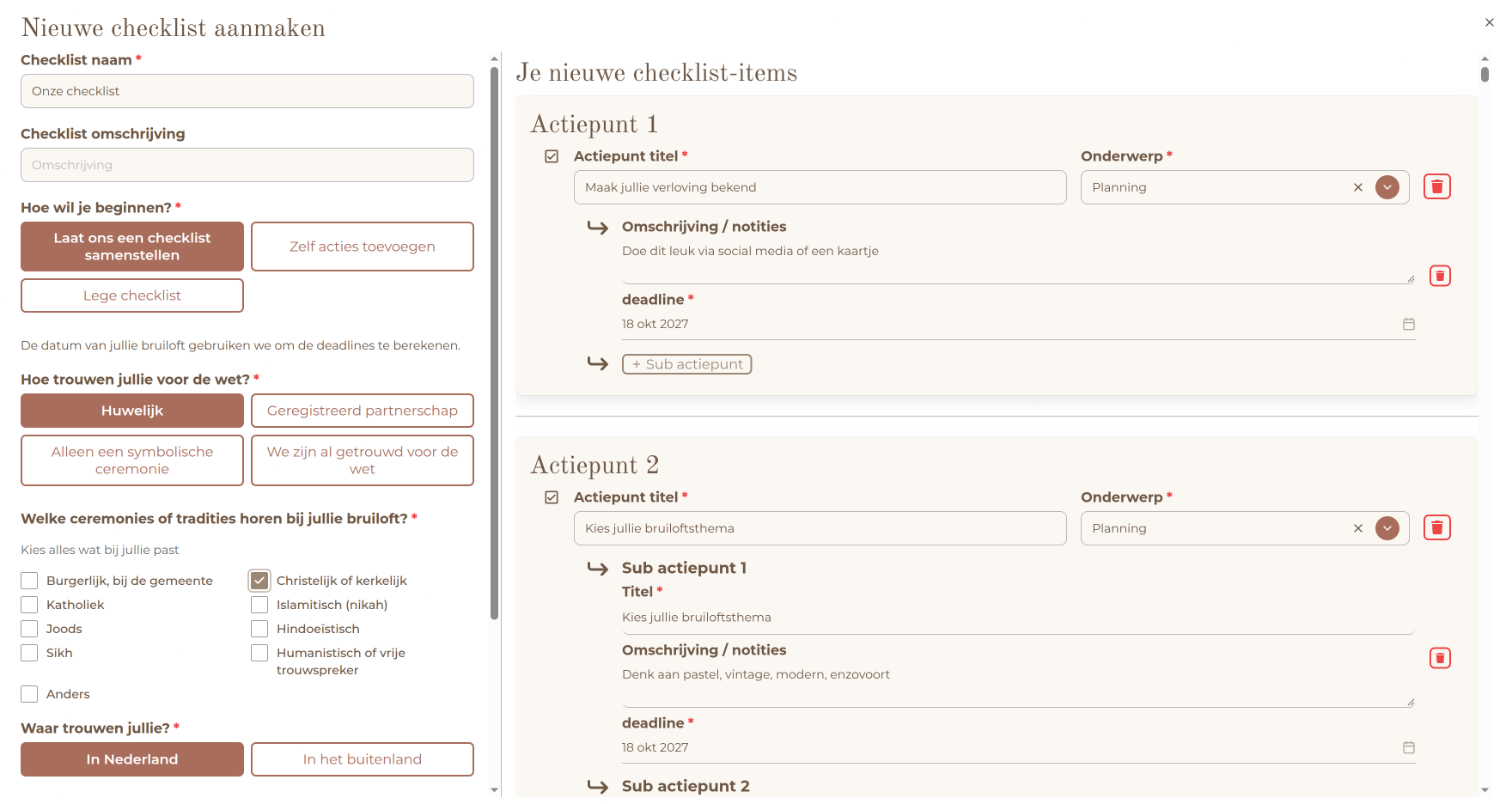
Answer a few questions about your wedding and BruiloftBuddy builds a complete checklist for you, with a deadline for every task. Whether you're getting married at the town hall, in church, with a nikah or abroad: the list fits your wedding.
What you can do:
November
- Major
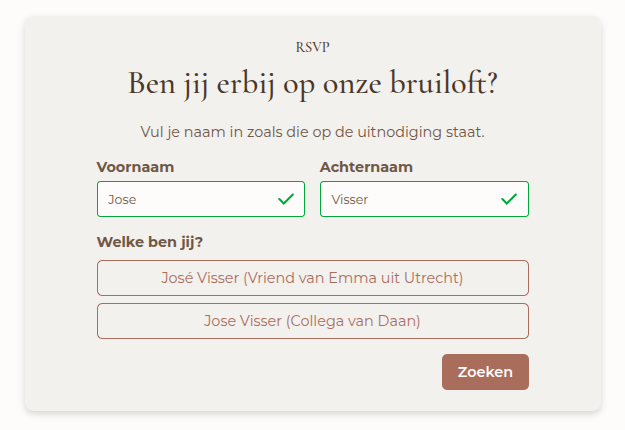
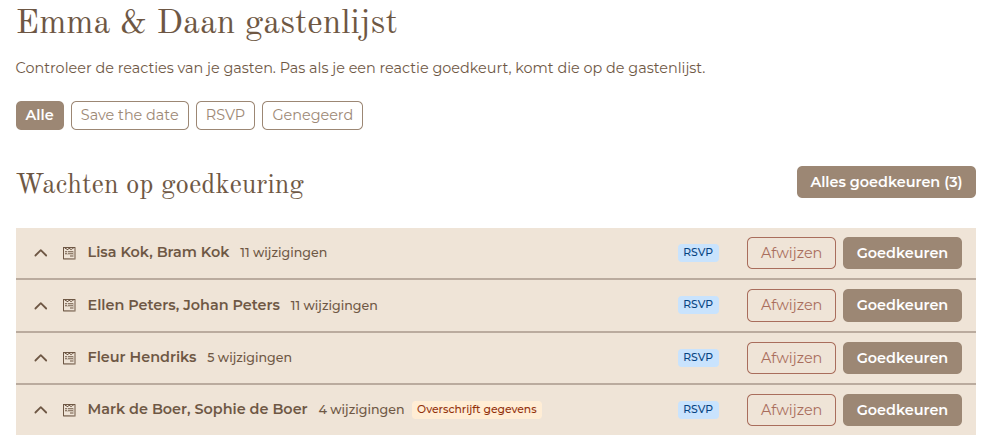
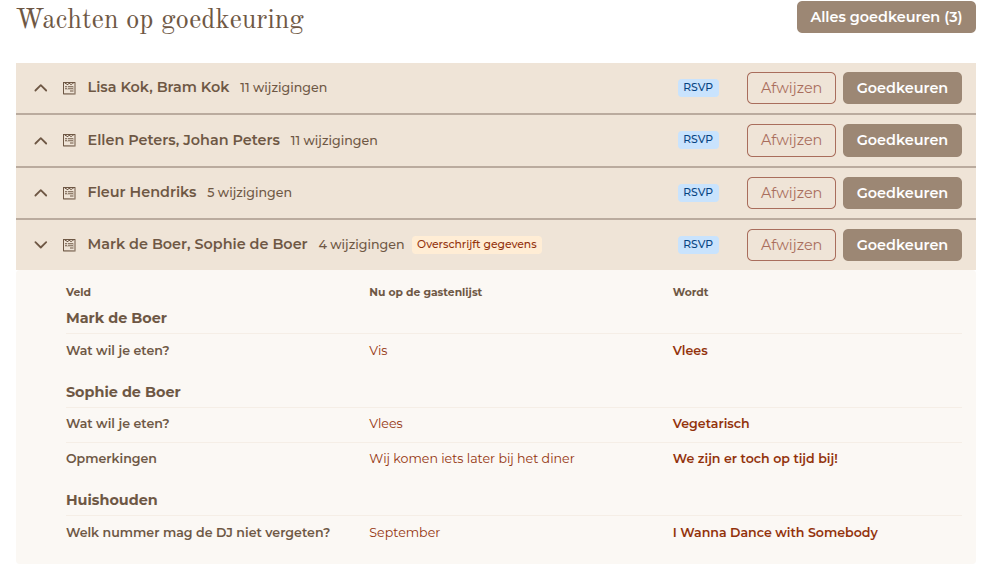
Your RSVP and save-the-date pages now work together with your guest list. Your guests look up their own name and reply for themselves and their household. Every reply comes to you first, so nobody ever ends up on your list without you knowing.
What's better:
November
- Major
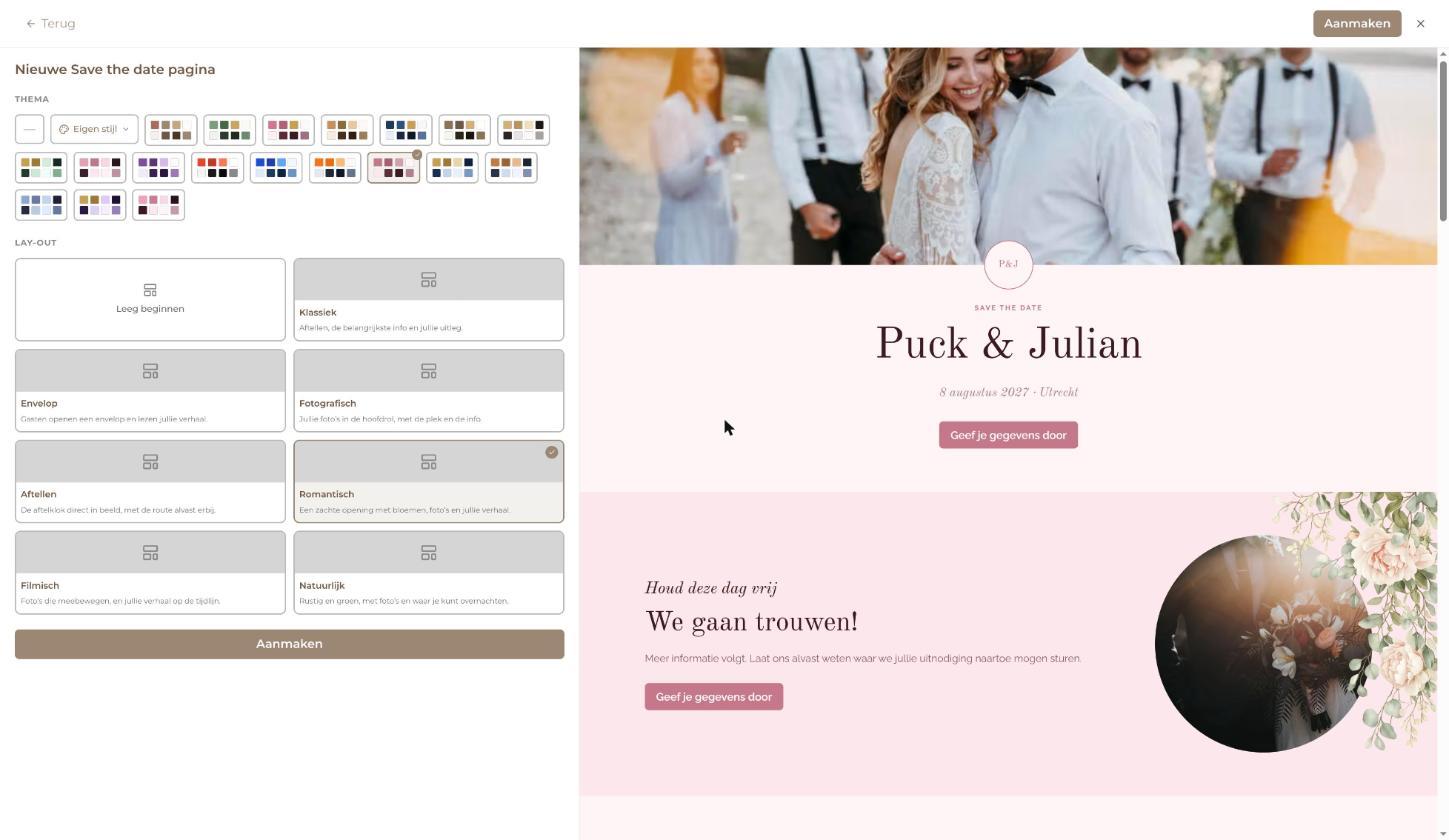
No more chasing addresses. You share a save-the-date page with your guests and they fill in their names and address themselves. Then you add them to your guest list with one click, without retyping anything.
What you can do:
November
- Minor
From the invite to plan together to the confirmation of an RSVP: all our emails now look better and are clearer. You see straight away what's expected of you, on your phone too.
What's better:
November
- Major
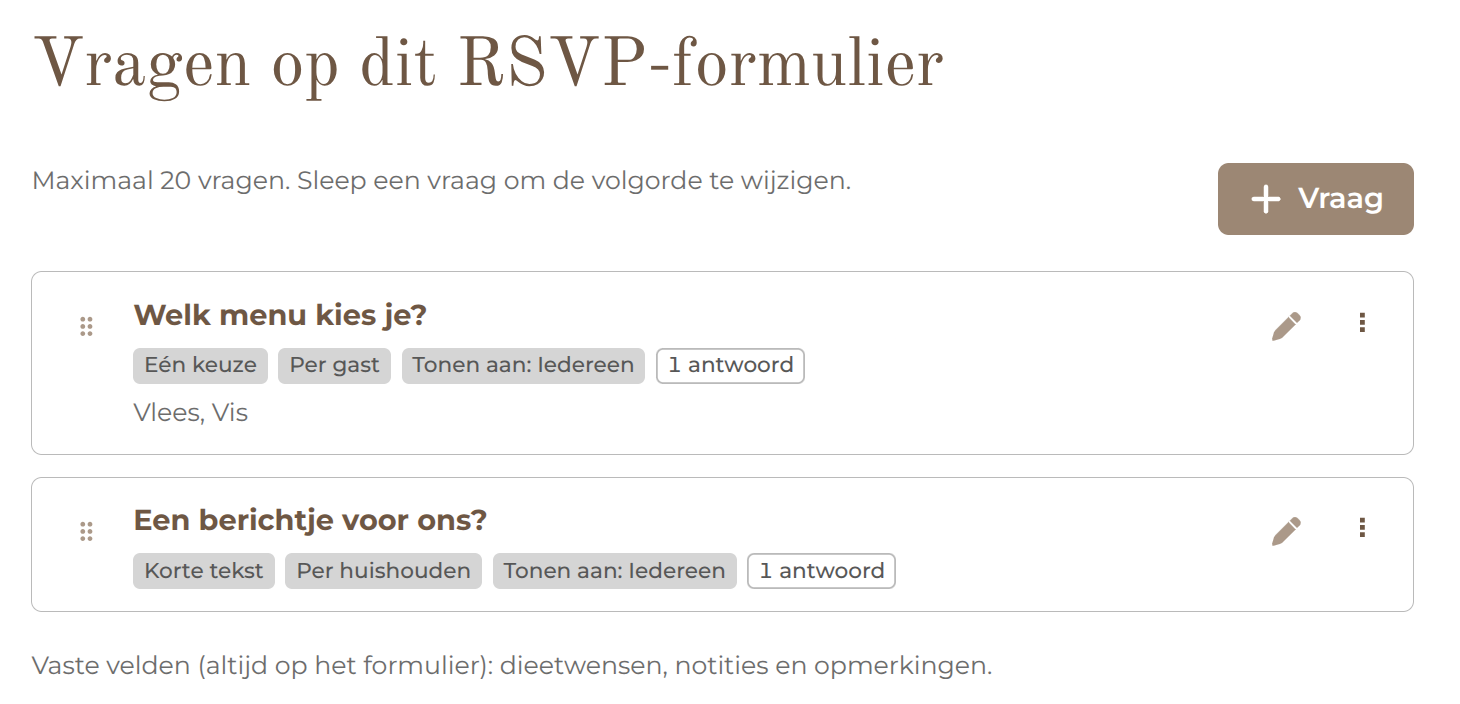
Which menu are your guests choosing? Are they coming by car? Is there anything else they'd like you to know? You can now add your own questions to the RSVP form, and the answers end up in your guest list automatically.
What you can do:
November
- Minor
If you use the BruiloftBuddy app, you naturally want the latest features. We now let you know automatically when an update is ready.
What's better:
November
- Minor
With the photo add-on, every gallery now gets more than twice as much storage. So the videos from the party fit in too. And in your files you can now see exactly how much space you have left.
What's better:
November
- Minor
Your wedding and all your photos stay with us, long after the big day too. If nobody uses the wedding any more, we tidy it away after a while. You'll always hear about it well in advance.
How it works:
November
- Patch
This month we put a few more things right, so everything simply does what you expect.
What's better:
October
- Minor
Not every wedding fits into one day. Getting married at the town hall on Friday with the party on Saturday? Or a pool party the day after? Your parts of the day can now fall on other days too, and your guests see exactly when they're expected.
What you can do:
October
- Minor
Curious what your RSVP page could look like? In the editor demo on our homepage you can now choose a design yourself. Met us at a wedding fair? Then your personal discount code is ready and waiting at checkout.
What you can do:
October
- Minor
An average tells you little about your wedding. With the wedding budget calculator on our website you see how your own budget works out: enter what you want to spend and you immediately see how it splits across the budget items. You can then fine-tune that split in the app.
What you can do:
Try it at How much will your wedding cost?
October
- Minor
Tried to change the time of a part of the day or an event in your timeline on your Android phone? That didn't work. It's fixed now. And wherever you look in BruiloftBuddy, dates are now shown the same way everywhere.
What's better:
A few things in BruiloftBuddy didn't work the way you'd expect. We've fixed them.
What's better:
October
- Minor
Which plan suits you? Now you can see it at a glance. The app and the website show the same plans side by side, and when there's an offer on, you see it right next to each plan. Then you check out securely in a few clicks.
What's better:
See all plans on our pricing page.
October
- Minor
Plan your wedding on the go too: with the BruiloftBuddy app for iPhone and Android you always have your guest list, budget and wedding day timeline to hand. We've now made the app a lot easier to find.
What you can do:
October
- Minor
Not quite sure where to start? At the bottom right of the website and in the app there's now a "Need help?" button. Tell us what you're looking for and you instantly get the articles that help you further. In the app we already know when you're getting married, so one question is enough there.
What you can do:
October
- Major
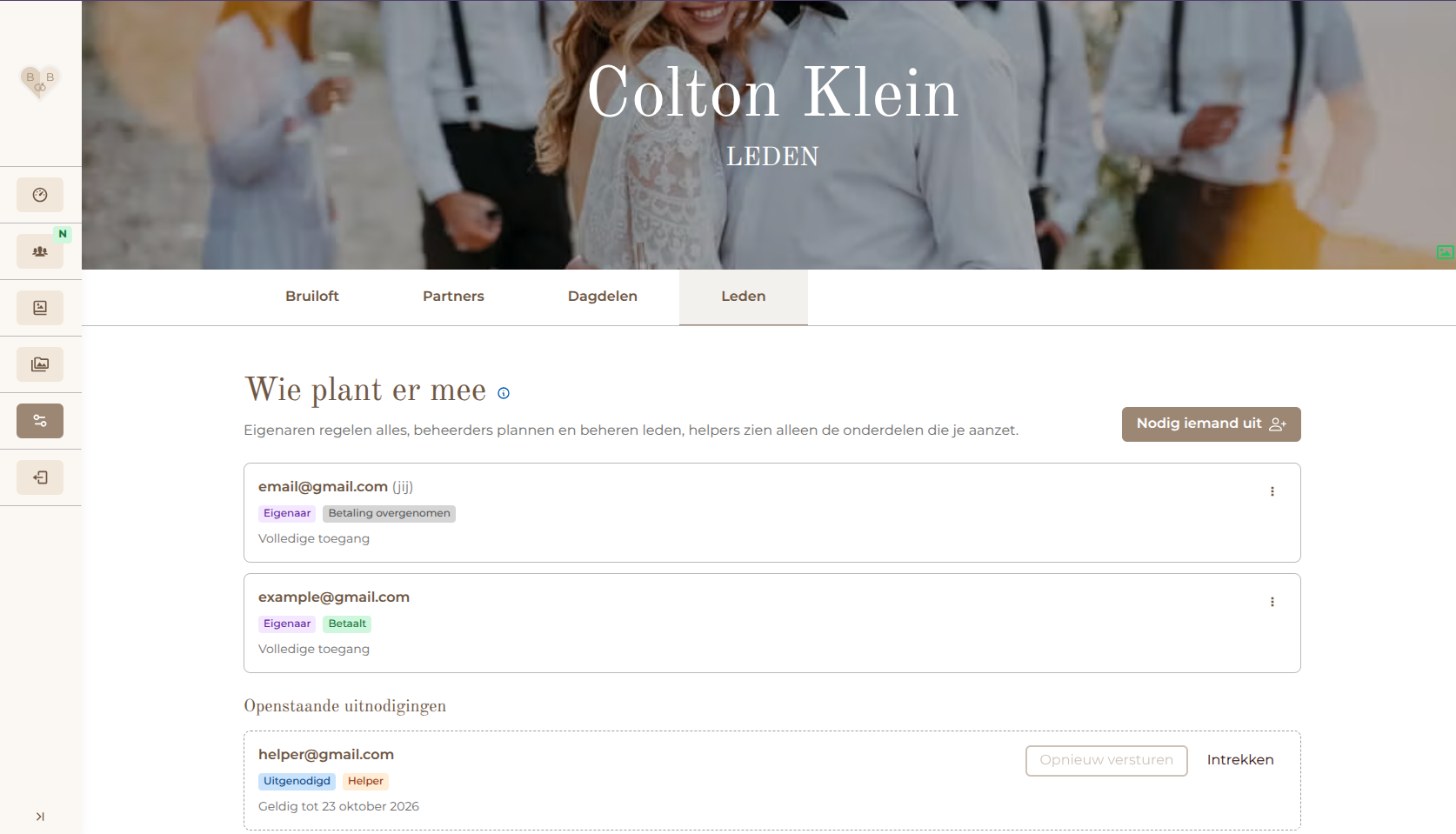
You rarely plan a wedding on your own. Invite your partner, master of ceremonies (ceremoniemeester), parents or wedding planner to your wedding. Everyone gets their own login, and you decide per person what they can do.
What you can do:
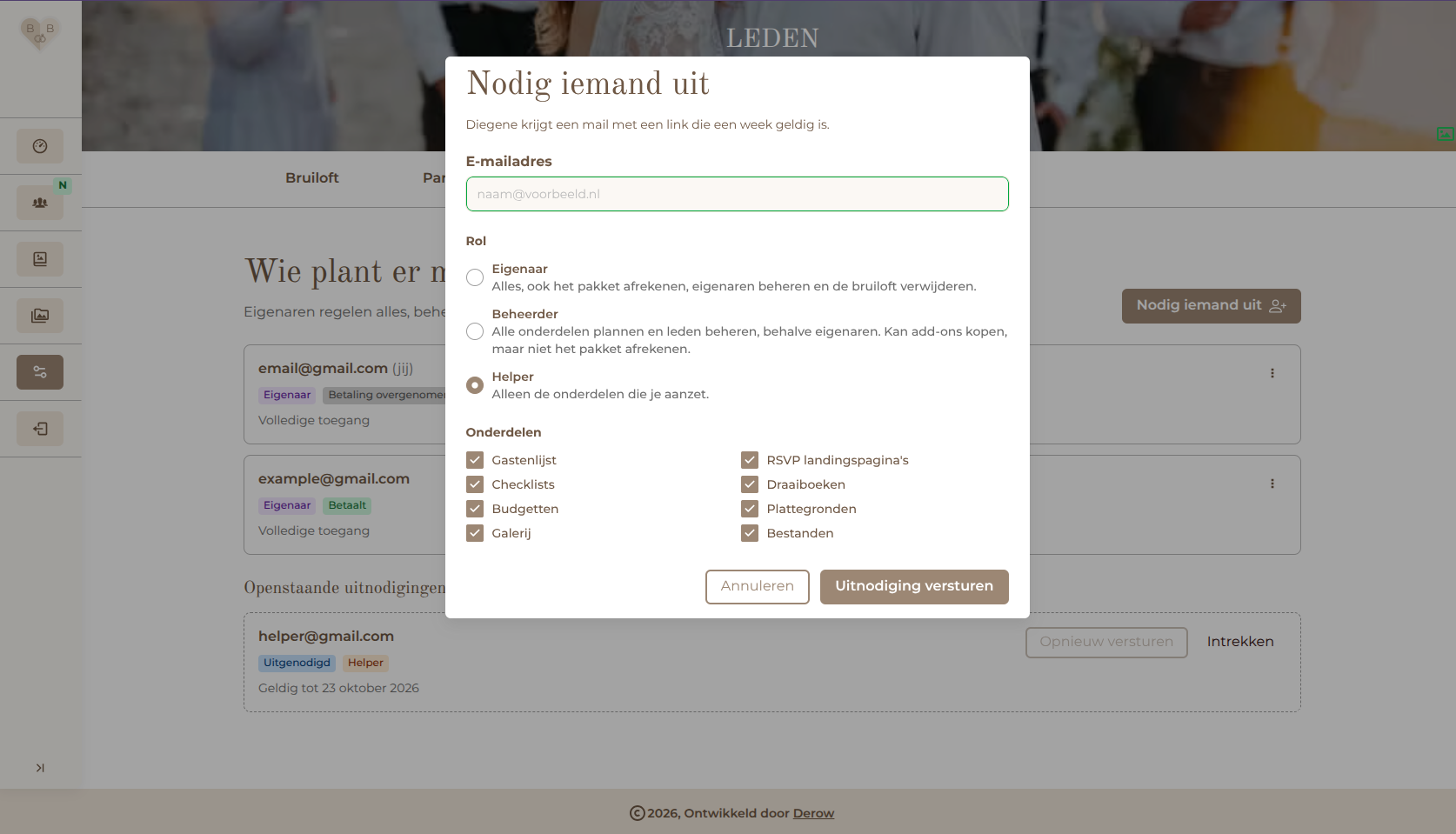
You'll find it under Wedding settings, Members tab, or via the step in Getting started on your dashboard. Read more in planning your wedding together.
October
- Major
Is your guest list already in Excel? Then there's nothing to retype. Download the template for your wedding, add your guests and upload the file. You first see exactly what's going to happen, and only when you confirm are your guests added to your list.
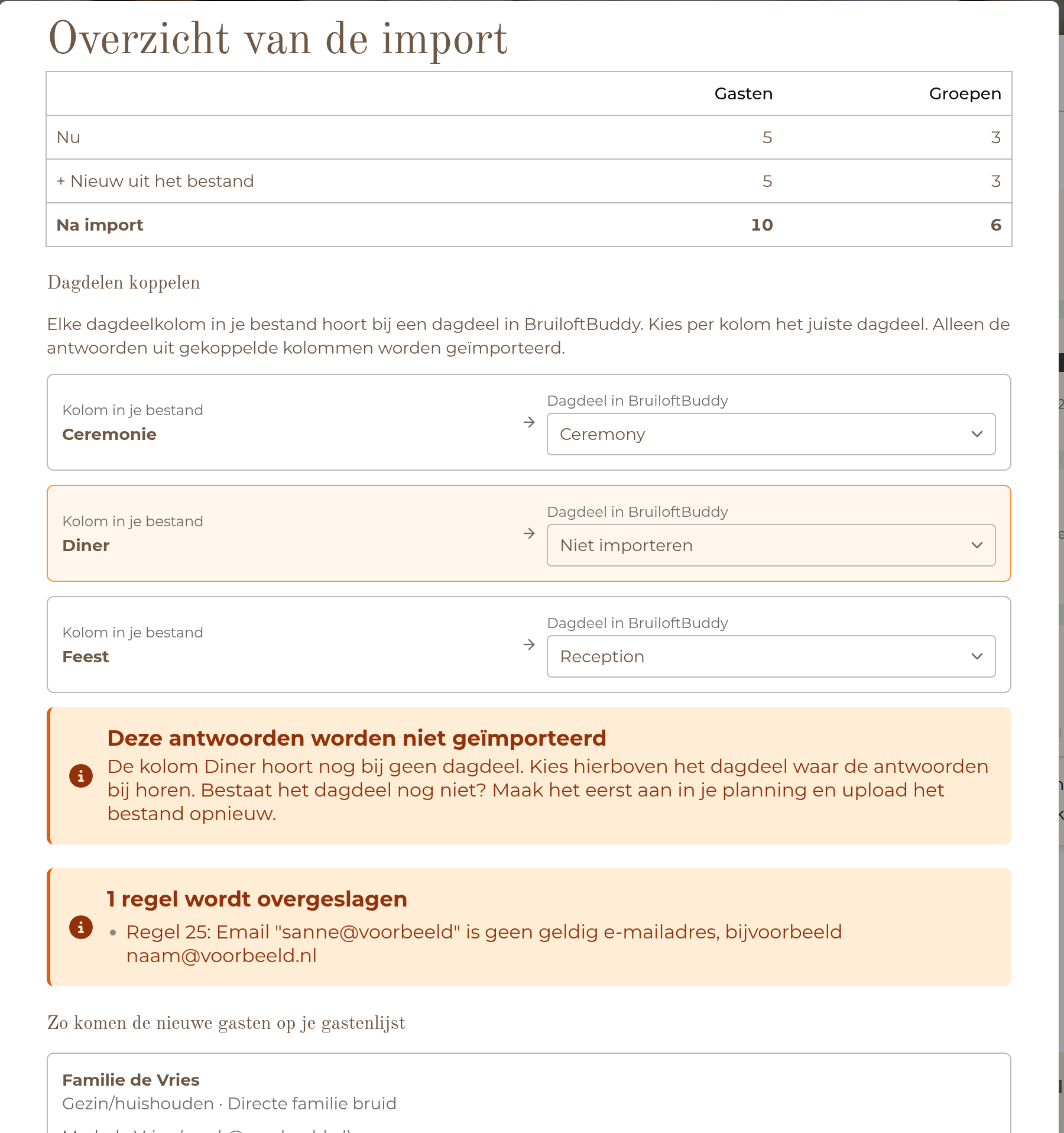
What you can do:
Open your guest list and click Import from Excel.
October
- Patch
This month we put a few more things right behind the scenes, so everything simply does what you expect.
What's better:
September
- Minor
The seating plan may well be the trickiest puzzle of your wedding. Aunt Ria next to Uncle Henk, the colleagues together, the friends from secondary school in one row. Dragging seat by seat takes a lot of time. That's why you can now seat a complete guest group in one go.
Choose a group, point to a table or row and you immediately see which seats will be filled. Looks right? One click and everyone is seated. That way you have a first draft in a few minutes that you can then shuffle around at your leisure.
What you can do:
Open your floor plan and try it with your first guest group.
September
- Minor
Your feedback is worth its weight in gold. This month we tackled quite a few small things that make planning just that bit smoother, especially in the sections you open most often.
What's better:
September
- Patch
Not everything we build catches the eye, but you do notice it. A few improvements behind the scenes:
August
- Major
The RSVP page editor works with separate blocks that you put in order yourself. Where an RSVP page used to be a fixed template, a card at the top and a form underneath, you now build it yourself: from minimal (photo, date and form) to a full page with several sections telling your story.
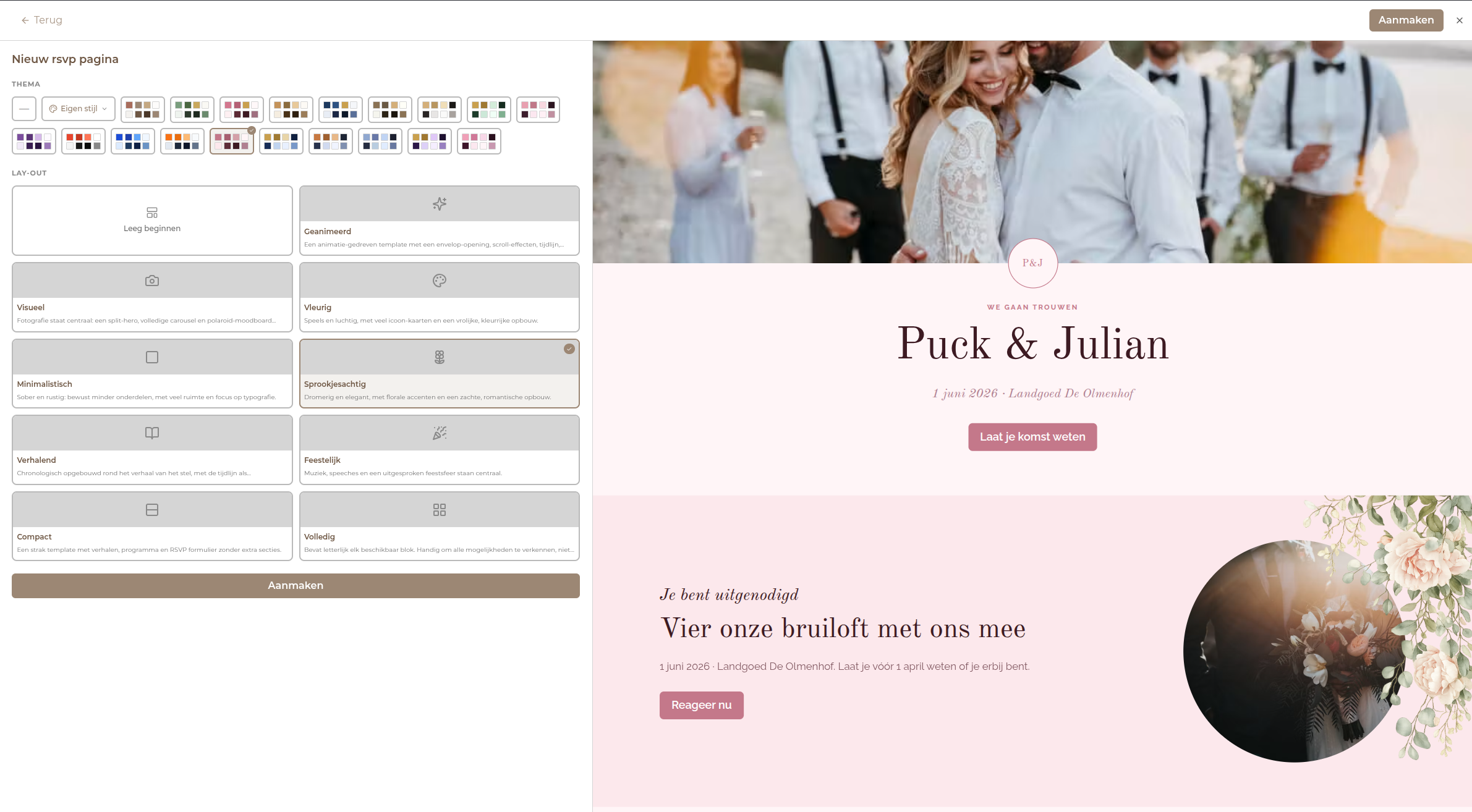
What you can do:
May
- Major
With the floor plan editor you draw the layout of your dinner, ceremony or other occasion, place tables and seats to measure, and assign guests straight to their place. Everything is saved automatically and easy to find again at a glance.
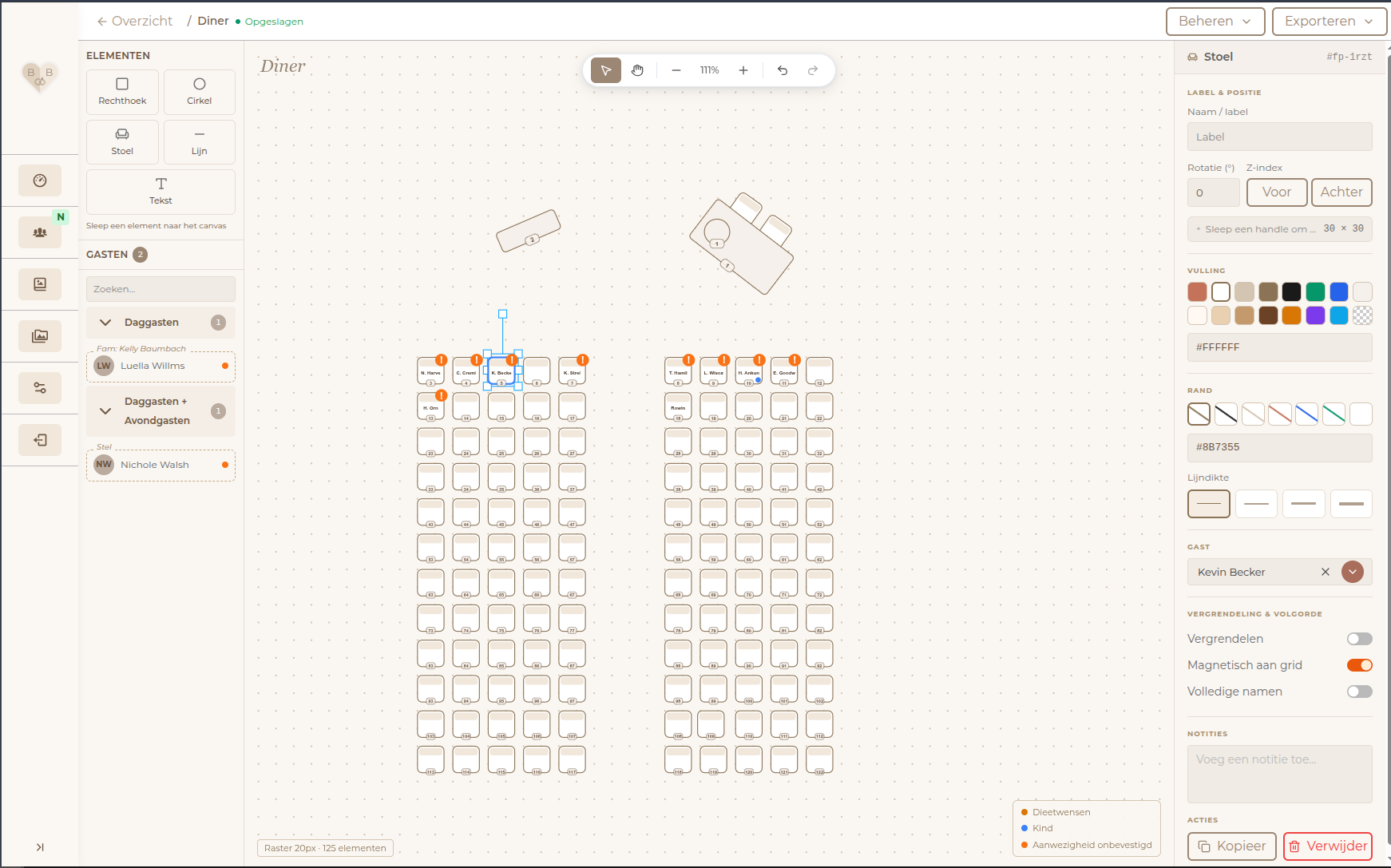
What you can do:
May
- Minor
After the wedding you want one thing: to keep all the beautiful moments your guests captured. Not scattered across dozens of phones, but in one place. With the online photo gallery, that's now possible.
Create a gallery, share the QR code or link with your guests and let them upload photos and videos straight away. You decide whether guests give their name when uploading and how many photos they can send in.
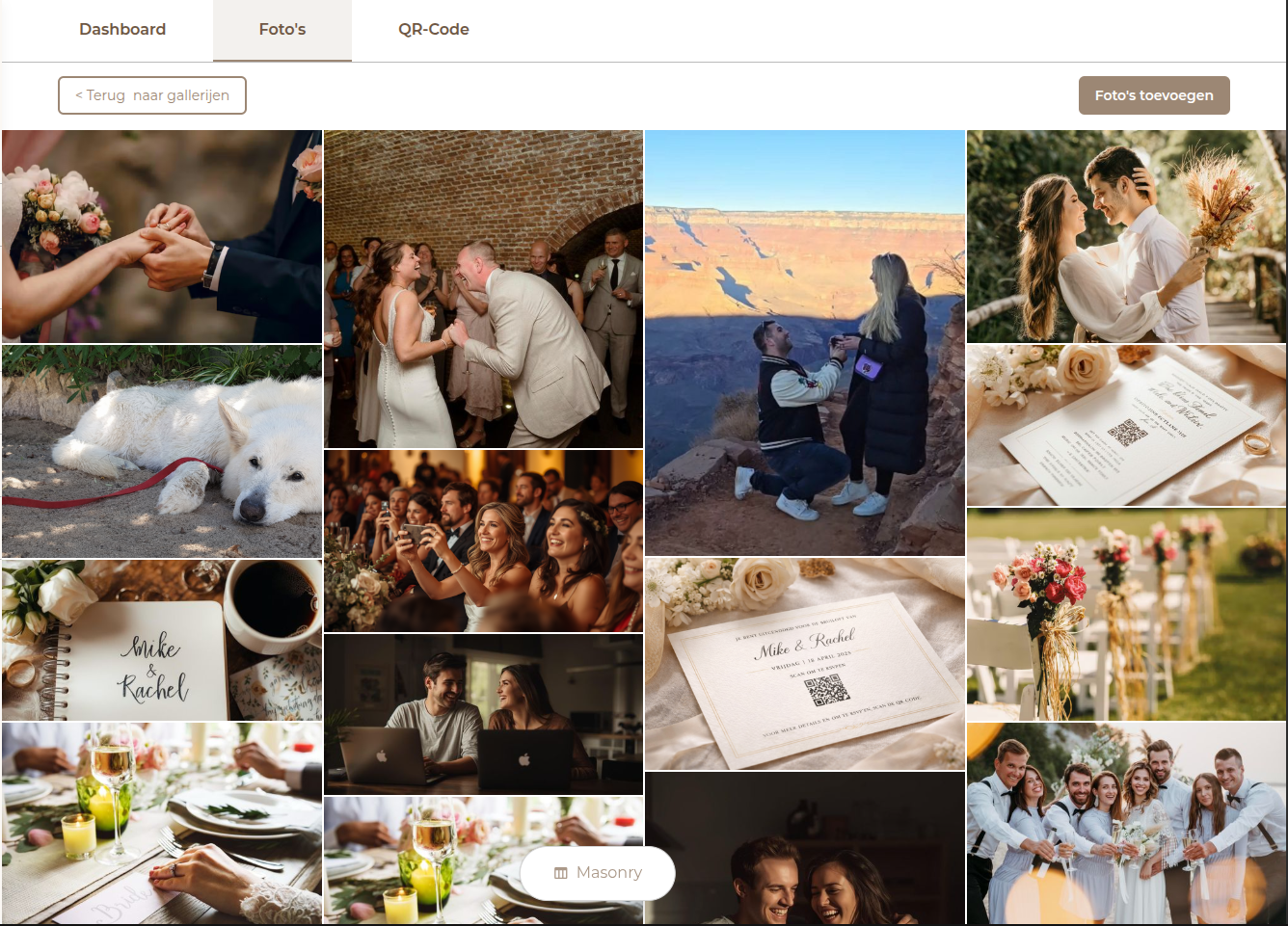
The gallery has three statuses: open for uploads, selection mode and published. That way you stay in control of what guests eventually get to see.
Take a look at the gallery in your dashboard and create your first album.
April
- Major
BruiloftBuddy now runs on its own servers, fully managed with Kubernetes on Hetzner. With this we've moved away from Vercel as our hosting platform. It's a step that gives us more control over performance, reliability and scalability.

The application feels faster, is more stable and handles bigger tasks better than before. Think of downloading a complete photo archive or other processes running in the background. They now run more smoothly and reliably, without you noticing a thing.
The migration was completely seamless: existing data, settings and connections stayed exactly the same.
All of this was a big step in the professionalisation BruiloftBuddy is currently going through.
March
- Minor
When you log in to BruiloftBuddy for the first time, you don't want to spend hours working out where to start. We get that. That's why we've built an interactive tour that takes you by the hand straight away.
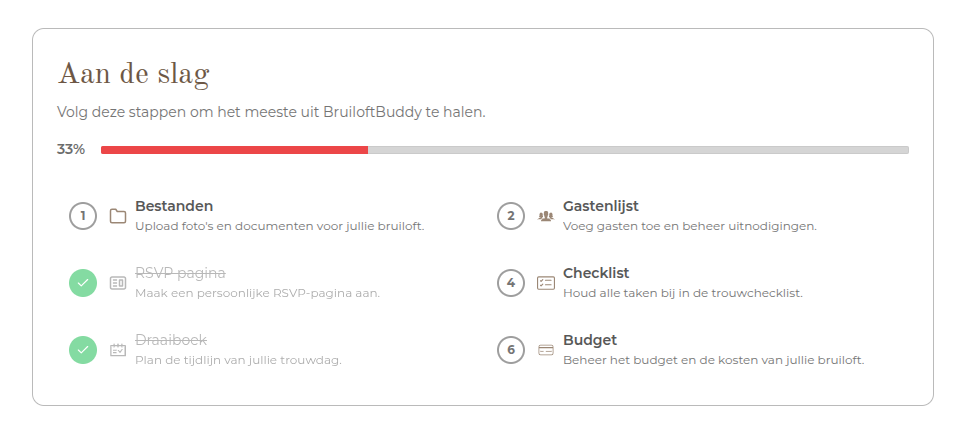
The tour starts automatically the first time you open a section. On each page, a series of tooltips explains step by step what you're looking at, what you can do and how everything fits together. Skipped the tour or want to see it again? You can restart it at any time from the settings.
After the tour, a clear getting started checklist appears on your dashboard. It keeps track of which parts of the app you've already set up: have you filled your guest list, created your RSVP page, set up your budget? The checklist shows you, so you never feel you're missing something. Once everything is set up, the checklist disappears from your dashboard automatically.
Technically, the app saves the progress of each tour per user in the database. That means the tour doesn't restart when you log in on another device, and your partner who shares the account doesn't have to go through the same tour again.
March
- Minor
The dashboard is the first thing you see when you log in, and it should be clear at a glance where you stand. Following feedback from our first users, we've redesigned the layout.
The three most urgent checklist tasks are now right at the top, sorted by deadline. Below them you see the progress of your guest list: how many guests have been added, how many have replied and how many are still awaiting confirmation. The budget block shows how much you've planned versus how much has already been spent, with a simple progress bar.
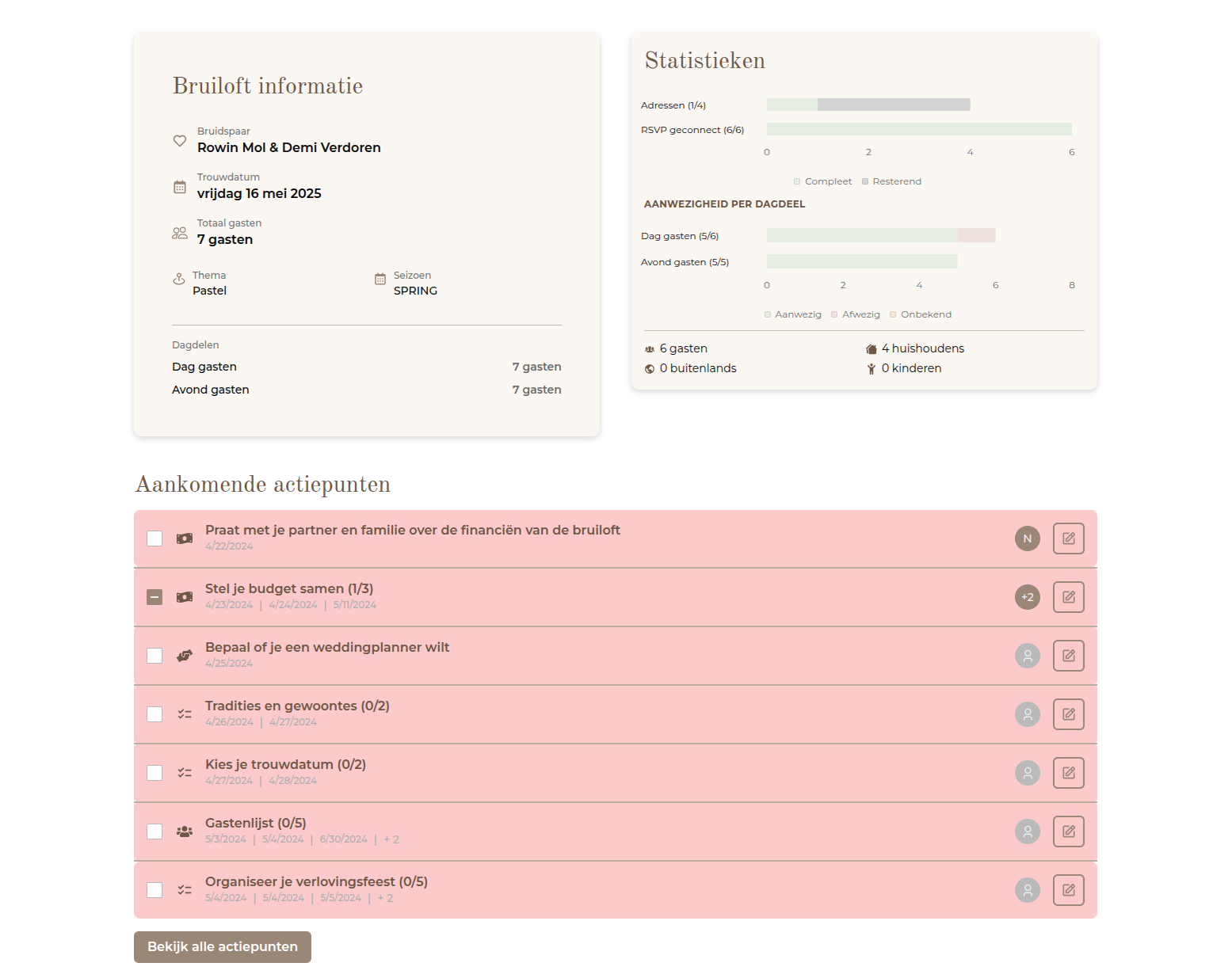
Also new is the wedding date countdown. At the top of the dashboard you see exactly how many days are left until your big day. A small detail, but one that got quite a reaction during our testing phase.
The dashboard is built as a live overview: data is pulled dynamically from all sections and updated in real time. There's no separate page to navigate to; everything comes to you.
February
- Minor
Until recently you couldn't change your account details yourself, which was obviously not ideal. That gap is now fully closed with a comprehensive settings page.
You can now change your email address through secure two-step verification. It works like this: you request the change, and a confirmation email is sent to your current address. Once you've confirmed it, you receive a second email at your new address. Only when that address has been verified too is the change made. This stops anyone else from taking over your account simply by entering a new email address.
Changing your password works through a similar secure flow. You enter your current password and choose a new one. Passwords are never stored in readable form, always as an encrypted hash in the database.
January
- Major
A wedding costs money, often more than you expected beforehand. Keeping your finances in check is one of the questions couples ask us most. With the launch of budgets, we now have a complete answer.
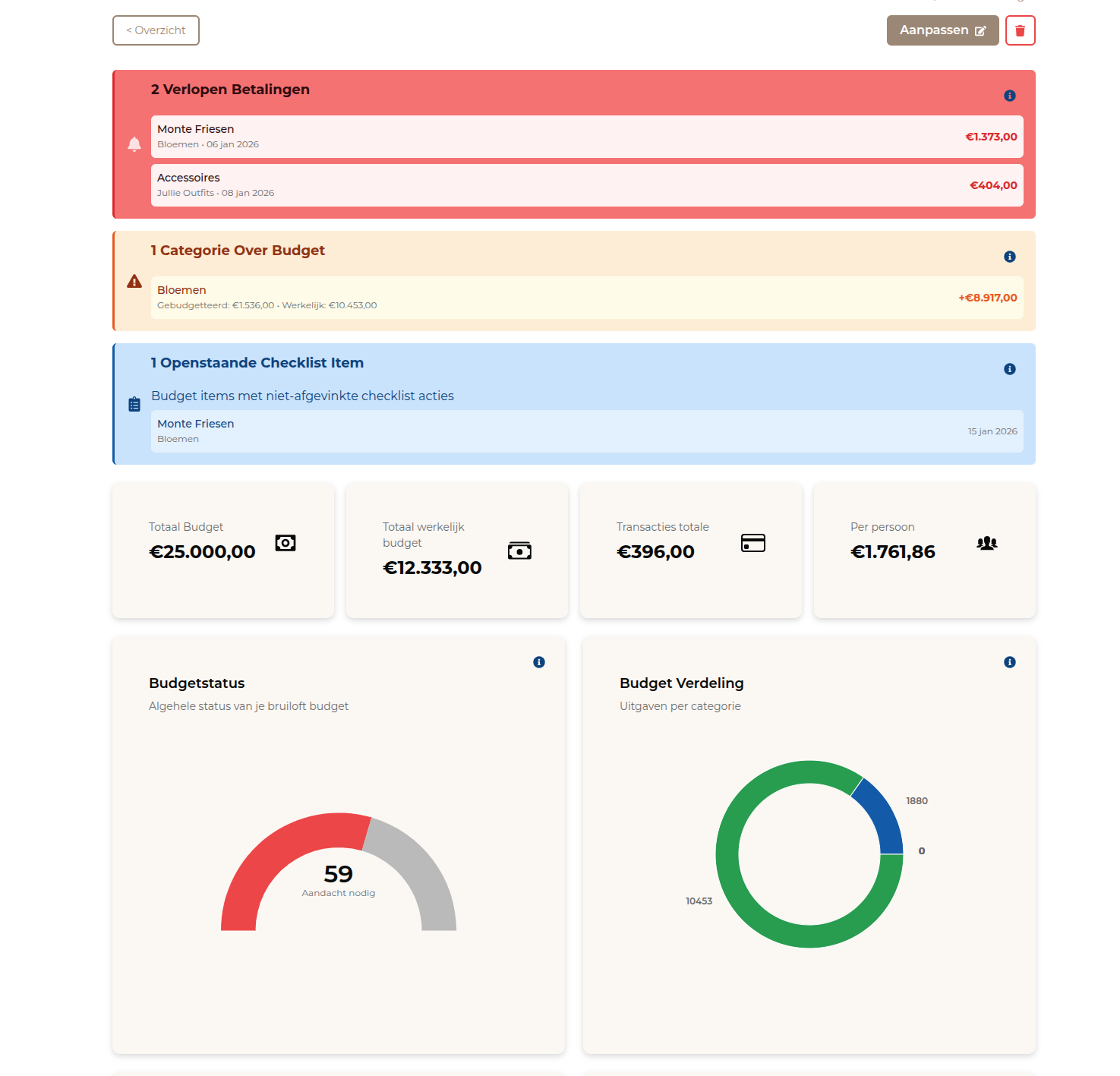
You start by creating a budget with a total amount. You split it across categories such as catering, venue, photography, flowers and entertainment. In each category you add budget items with an estimated cost and an expected payment date. As soon as you make a payment, you record it under the matching item: amount, payment date, payment method, paid to and paid by. You can also upload a receipt or invoice from the media library and link it to the payment.
The actual cost per item is calculated automatically from the payments you've entered. So you never have to add anything up by hand.
Three charts appear on the dashboard: your budget split per category, planned versus actual per category, and a cash flow chart showing when each expense was made. That way you track not only what you spend, but also when.
Budgets are also linked to the checklist: if you mark a checklist task as a budget payment, you can link it straight to a budget item. Handy when you want to keep track of a deposit to a supplier.
Using BruiloftBuddy and missing something? Or have an idea that would make the app better? We'd love to hear it. Every suggestion is taken seriously, and the best ideas find their way onto the roadmap.
