Rowin Mol · April 5, 2026 · (8 months ago) · updated Nov 20
You have just said yes, and the first question everyone asks is: how many people are coming? It sounds simple, but anyone who has ever planned a wedding knows how quickly that list grows, shrinks and gets completely muddled. Relatives you do or don't want to invite, friends who have brought a partner along, children or no children. Before you know it you have five versions of the same Excel file and nobody knows which one is current.
In this article you will read how to build a wedding guest list that is well organised from the start, so you don't get stressed later about RSVPs, dietary requirements or sending out invitations.
Start with a rough list of everyone who might qualify, without selecting straight away. Only then set a maximum number, and manage families and groups as one unit. Finally, link the list to your RSVP: you then approve each reply with one click, without retyping anything.
Most couples make the mistake of starting to select straight away. First write down everyone who has even a small chance of being invited. Think of:
Give each person a category: A (definitely invite), B (probably), C (maybe). That leaves room to cut people later without having to make every choice right away.

Agree a firm upper limit with your partner before you begin. It prevents endless discussions later. Take into account the capacity of your venue, your budget per guest and whether you want an intimate or a big wedding.
A handy approach is to manage groups rather than individual guests. A family is one unit. A couple is one unit. That way you can see at a glance how many people each invitation covers, and it stays manageable.
For each group you record:
Within each group you then manage the individual guests with their own details, such as dietary requirements, phone number and whether they are a child.
Many couples run their RSVPs separately from their guest list. Guests fill in a form, the form ends up somewhere, and someone has to copy everything across by hand. That takes hours and almost always goes wrong.
Link your RSVP directly to your guest list. Guests look up their own name and reply for themselves and their household. You approve that reply with one click. The details are then stored with that guest, with no retyping, and you see in real time who has replied.
Don't ask too much. Most couples ask for:
You rarely need more than that, and the easier you make it, the more forms come back completed.

Not everyone comes for the whole day. Your parents are there for the ceremony, your colleagues only join for dinner. And then there is that one cousin who turns up as soon as the band starts. If your RSVP only asks "are you coming?", you end up with fifty yeses and no idea which moment each yes belongs to.
You only notice when the caterer asks for numbers and the venue wants to know how many chairs to put out for the ceremony. Then you spend that evening tallying your list moment by moment after all. Exactly the work you wanted to avoid.
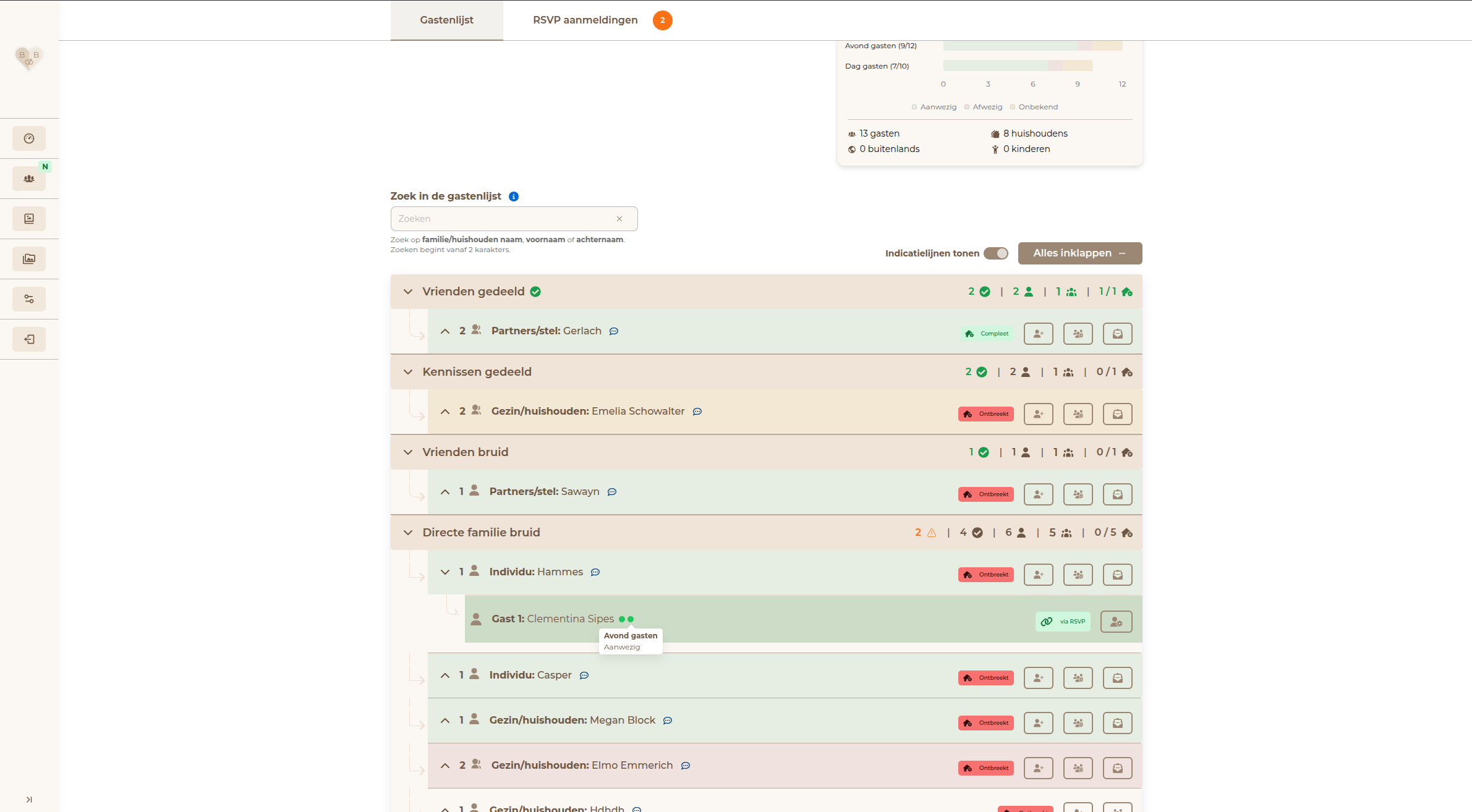
So link your RSVP form to your parts of the day. A guest says for each part of the day whether they are coming, and as soon as you approve it, that reply appears per moment in your guest list. All you have to do is look at who is at the ceremony and who only joins for the party. No adding up, no version six of the same file.
This is the part that almost always goes wrong. Dietary requirements arrive via WhatsApp, via the RSVP, via a phone call from your mum. They end up spread across three places, and on the day itself the caterer doesn't know about them.
Make sure dietary requirements are kept in one place, linked to the guest. Then the day before the wedding you can export an overview or show it to your caterer without having to compile everything again.
A spreadsheet is free and familiar, but it isn't built for this. You can't link RSVP forms to it, you can't generate QR codes for invitations with it, and you get no automatic status updates per guest.
Is your list already in Excel? Then move it across in one go without retyping a thing.
Prefer to have everything in one document? Download the free whitepaper on a guest list without the chaos.
BruiloftBuddy has a guest list built specifically for this process. You create groups, add guests, link an RSVP page and see in real time who has replied. Dietary requirements are saved per guest as soon as you approve a reply.
A good guest list is the foundation of everything. Who is there, what they eat, which part of the day they come for. Once that is in order, you won't have to chase anything on the wedding day itself. Set up the system early and you buy yourself months of peace of mind.
Read also: How do you send RSVP invitations for your wedding? and How to manage dietary requirements for your wedding without stress

Rowin Mol
Rowin Mol is the founder of BruiloftBuddy. He got married in 2024 and, while planning his own wedding, found that on top of the tools he was using he still needed a separate spreadsheet for the guest list, attendance and the wedding day timeline.
Out of that frustration he built BruiloftBuddy: the platform he wished he'd had himself.
Try it yourself
Build your own wedding website
The editor on the homepage is the real editor, not a video. You see what you're making straight away.
Open the editorRowin Mol
Rowin Mol is the founder of BruiloftBuddy. He got married in 2024 and, while planning his own wedding, found that on top of the tools he was using he still needed a separate spreadsheet for the guest list, attendance and the wedding day timeline.
Out of that frustration he built BruiloftBuddy: the platform he wished he'd had himself.
Try it yourself
Build your own wedding website
The editor on the homepage is the real editor, not a video. You see what you're making straight away.
Open the editor
Find out how to keep track of your guest list, RSVPs and attendance per part of the day, without needing a spreadsheet on the side.

First write down everyone with even a small chance of being invited, in categories A, B and C. That way you can cross people off later without having to make tough choices straight away.
Manage guests as a guest group, for example a family or a couple as one unit. That way you see at a glance how many people are coming per invitation.
No more than you need: attendance and the part of the day they are coming to. More questions are rarely needed, and the easier it is, the more forms get filled in. Want to know something extra, such as the menu choice? In BruiloftBuddy you add your own questions to the form for each RSVP page.


