Rowin Mol · October 9, 2026 · (2 months ago) · 10 min reading time · updated Nov 20
In short
The invitations are out and the replies are coming in via WhatsApp, phone calls and stray messages. That is when you want one place where everything comes together.
Short answer: with an online RSVP, guests tell you whether they are coming via a link or QR code on the invitation. Ask each person which parts of the day they are coming to and what dietary requirements they have. Set your reply-by date a week or two before your caterer needs the final numbers. Guests look up their own name and reply for themselves and their household. Once you approve the reply, it appears per part of the day in your guest list. You can try it free for seven days.
This piece runs from setting up your RSVP page to what happens to a reply once it is in. In a hurry? Start at How do you create an online RSVP for your wedding?. Why the reply-by date falls where it does is explained under How far in advance do you ask for an RSVP?.
RSVP stands for "Répondez s'il vous plaît", French for "please reply". On a wedding invitation it means: let us know whether you are coming.
In the past there was a reply card that had to go back by post. An online RSVP asks the same thing, but your guest fills in a form on a web page. That can be a bare form, or a complete invitation page with your photo, the order of the day, the venue and the form at the bottom. How to make an invitation page like that is explained in making a digital wedding invitation: how it works.
For your planning, what matters most is what happens to the reply once your guest presses send. Does it end up in a separate list, or with the right name in your guest list? More on that below.
There are five steps. Stick to the order and you won't have to fix anything afterwards.
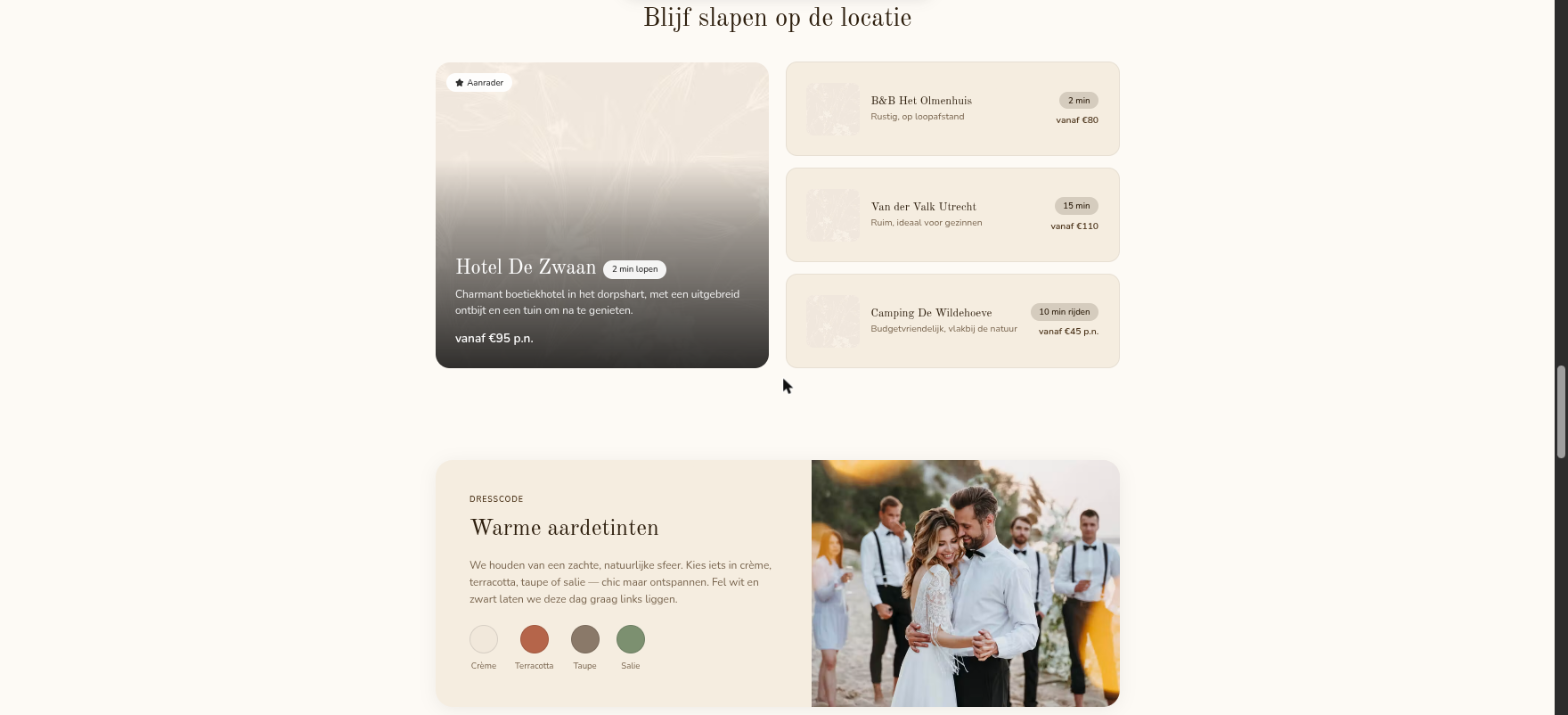
A guest who opens your link usually wants to know more than whether they are coming. What time do I need to be there, and can I park? Is there a dress code? If the answer is on the page, nobody has to message you about it.
What belongs on it in practice:
We had arranged a discount at a hotel and put it on our RSVP page, with breakfast the morning after the wedding as a separate part of the day. More than seventy people joined, some hungover, some still euphoric, a few who hadn't even slept. You hear all the stories from the night before straight away. We recommend a breakfast like that to everyone.
Keep the form itself short. Per person: attending or not, per part of the day, and any dietary requirements. If you ask for more, make sure you actually do something with it. Every extra question is a reason to close the form half-finished. Still want to know something extra, such as the menu choice or who is coming by car? In BruiloftBuddy you add your own questions to each RSVP page, and as soon as you approve a reply, the answers are stored with the guest in your guest list.
"Yes, we're coming" says little if your day has three parts. Your caterer works with the number of people at the table, and there need to be enough chairs at the ceremony. How many guests there are in the evening in turn determines what you spend at the bar.
At our own wedding we had day guests and evening guests. So we had two kinds of cards made: one for those coming all day, one for those joining in the evening. Each card showed the order of the day for that type of guest, with its own QR code. That code linked to a separate page for that part of the day. An evening guest only saw the evening, and was only asked about the evening. How to choose who becomes an evening guest and what to arrange for them on the day is covered in evening guests at your wedding.
We noticed the biggest benefit afterwards: the dietary requirements were ready per guest and went straight to the caterer, without retyping.
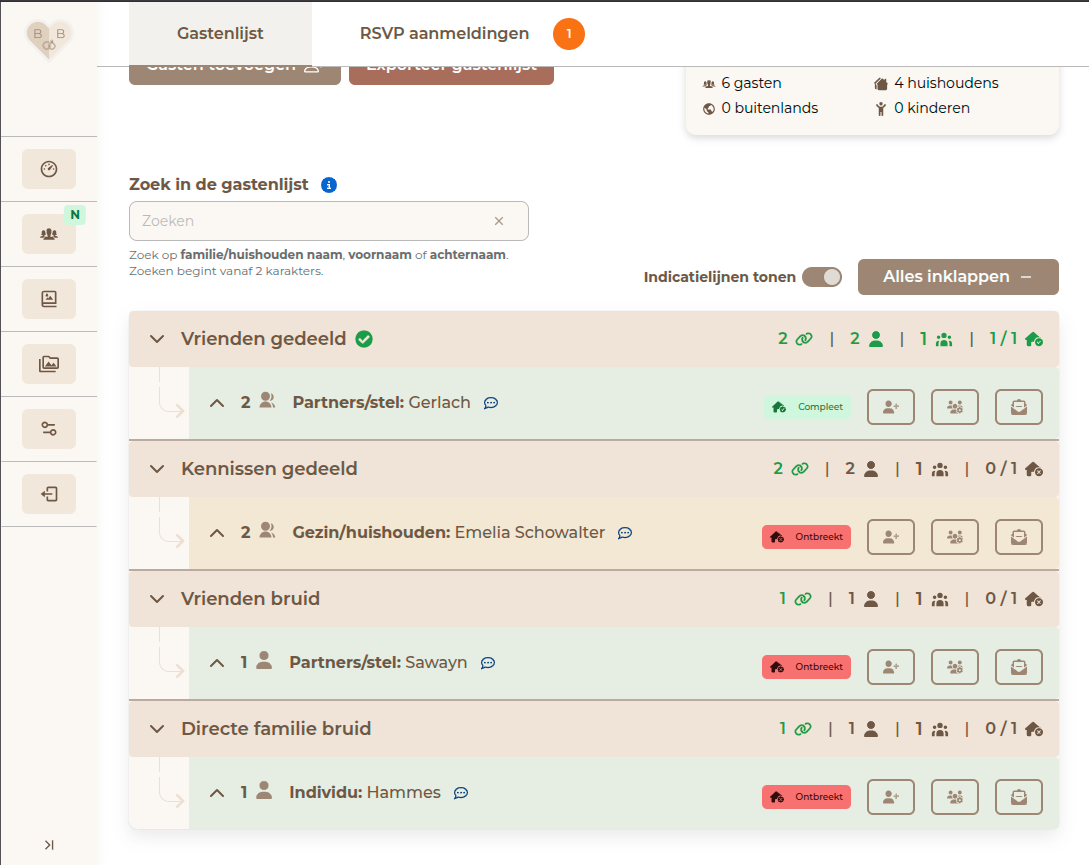
In BruiloftBuddy, linking per part of the day still works like that. A day guest sees the order of the whole day and ticks the ceremony and dinner, an evening guest only sees the party. Once you approve the replies, both answers appear per part of the day in your guest list. And it now goes one step further: the replies are also linked to the floor plan.
You have two options, and they work perfectly well together.
A link. Handy for digital invitations and for the family group chat. Keep it short and put a sentence around it, so it is clear where the link goes.
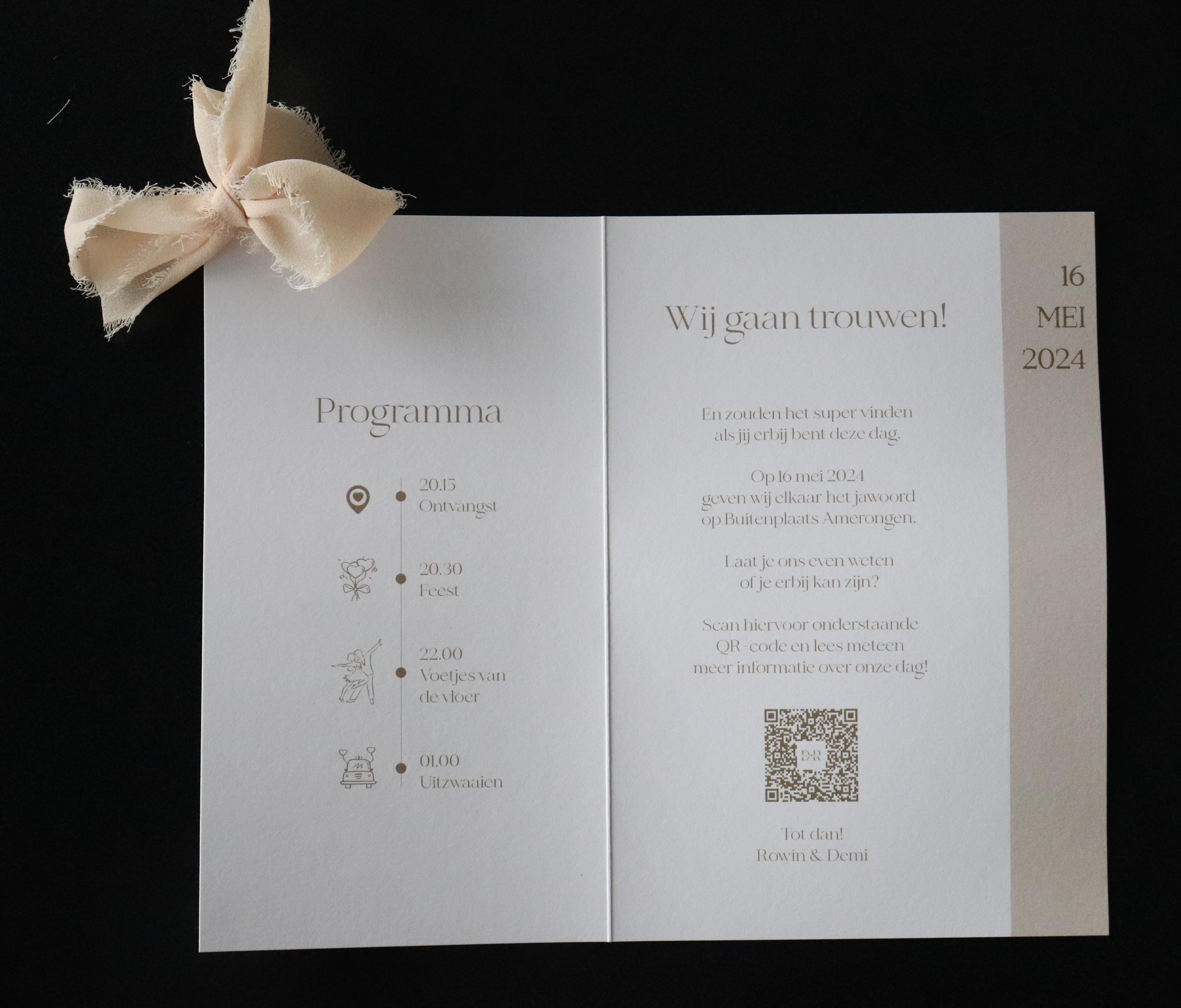
A QR code. Works well on a paper card. The invitation stays uncluttered, and anyone who wants to reply picks up their phone and scans. Don't print the code too small, and scan it on the printer's proof with a few different phones before you print the whole run. If you work with parts of the day, make a separate card per type of guest with its own order of the day. The code can be the same on every card: each guest only sees the parts of the day they are invited to.
That is how we had ours made by Studio Sproet, a Dutch stationery studio, and we were very happy with them. We recommend a custom card to everyone, especially if you work with parts of the day. We would have Studio Sproet design ours again in a heartbeat.
As for the wording, you don't need to think long about it. Write out what you mean rather than just putting "RSVP", because not everyone knows what the abbreviation RSVP means. For example:
Could you let us know by 1 March whether you can make it? Scan the code or go to <your link>. You'll also find the order of the day and how to get there.
Work back from your suppliers. Ask your venue and your caterer when they need the final guest numbers. Set your reply-by date a week or two before that, so you have time to ring the latecomers yourself.
You choose that date yourself and put it on your invitation and your RSVP page. In BruiloftBuddy the form stays open after that date too: if a guest replies a week late, their reply still comes in. How strict you are about it is up to you.
When the invitations themselves need to go out is covered in our piece on when to send your wedding invitations.
This is where RSVP tools differ the most.
With many tools, a reply comes in as a separate submission or as an export. That is neatly done, and easy enough to keep up with for a small group of guests. It starts to pinch as soon as a change comes in via WhatsApp. Then you have two lists, and after a few weeks you no longer know which one is right. That is what it looked like at our own wedding too. We kept the guest list in Excel, but the replies came in via the form in the first version of BruiloftBuddy. Day guests and evening guests each had their own page with a QR code, and their replies ended up in two separate tables. We did the seating plan in Excel again. So we had several lists side by side, and none of them was linked to the others.
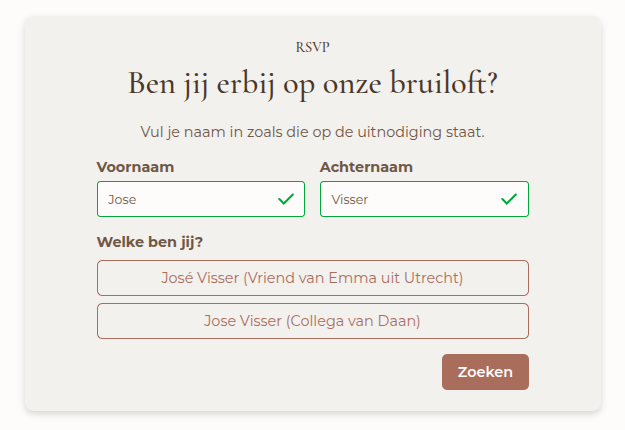
In BruiloftBuddy, replies arrive in an overview: the Guest submissions tab on your guest list. Each guest looks up their own name to reply, so every submission belongs to someone you put on the list yourself. Once you approve it, attendance per part of the day and dietary requirements are stored with that guest's name from then on, without retyping.
What else saves you time:
There are good free form builders. They look polished and work fine on a phone. For a birthday or a dinner party, that is all you need.
For a wedding you usually miss two things: parts of the day, and a link to your guest list. The replies come in for free, but then you copy them over to your guest list yourself. And again with every change.
You can try BruiloftBuddy free for seven days. In that week you build a real RSVP page with your real guest list and send it to a few guests to see what happens. If you don't take out a subscription afterwards, replies still keep coming in: your form doesn't get locked. What a subscription costs and what you get for it is on the pricing page.
Your guests certainly don't. They open a web page on their phone or laptop and don't need to install anything or create an account. That is why a link or QR code works so well: one tap or scan and they are on the form.
For the two of you, it is all about having an overview. You want one place where the RSVP, the guest list, the parts of the day and the dietary requirements come together. Whether that happens in an app or in your browser matters little, as long as you don't have to switch between three separate files.
Want to see what a page like that looks like first? Click the tablet image on our homepage and the real editor opens. You don't need an account and nothing is saved. Like it? Then set up your own page and link it to your guest list. You pay nothing for the first seven days. Try BruiloftBuddy free for seven days.

Rowin Mol
Rowin Mol is the founder of BruiloftBuddy. He got married in 2024 and, while planning his own wedding, found that on top of the tools he was using he still needed a separate spreadsheet for the guest list, attendance and the wedding day timeline.
Out of that frustration he built BruiloftBuddy: the platform he wished he'd had himself.
Try it yourself
Build your own wedding website
The editor on the homepage is the real editor, not a video. You see what you're making straight away.
Open the editorRowin Mol
Rowin Mol is the founder of BruiloftBuddy. He got married in 2024 and, while planning his own wedding, found that on top of the tools he was using he still needed a separate spreadsheet for the guest list, attendance and the wedding day timeline.
Out of that frustration he built BruiloftBuddy: the platform he wished he'd had himself.
Try it yourself
Build your own wedding website
The editor on the homepage is the real editor, not a video. You see what you're making straight away.
Open the editor
Find out how to keep track of your guest list, RSVPs and attendance per part of the day, without needing a spreadsheet on the side.

RSVP is short for "Répondez s'il vous plaît", French for "please reply". On an invitation, it asks your guests to let you know whether they are coming.
An RSVP link is the link to a web page where your guests fill in their reply. You put it on a digital invitation or turn it into a QR code on a printed card. In BruiloftBuddy you get that link as soon as you have created your RSVP page.
You can try BruiloftBuddy free for seven days. In that week you build an RSVP page linked to each part of the day, and with one confirmation every reply lands with the right guest in your guest list. If you don't take out a subscription afterwards, your form keeps working and replies still come in. What a subscription costs is on the pricing page. There are free form builders too. They work fine for a small group, but then you copy the replies over to your guest list yourself.
Scan the QR code on the invitation or open the link, fill in for each person whether you are coming and for which part of the day, and pass on any dietary requirements. You will get a confirmation email with a link to change things later.
Yes. After replying, every guest gets a confirmation email with a personal link. They can use it to update their attendance or dietary requirements themselves. You see the old and the new reply side by side and approve the change.
Call or message them yourself a few days after your reply-by date. Your guest list shows exactly who hasn't replied yet, so you don't have to guess whom to chase.


