Demi Mol · October 22, 2026 · (last month) · 8 min reading time · updated Nov 19
In short
In the screenshots, every wedding floor plan tool looks good. What you don't see there is how much work it takes when your guest list changes afterwards.
Short answer: choose a tool that takes your guests from your own guest list, so you don't retype names or keep two lists. Check whether the dietary requirements from your RSVP show up next to the guest on the floor plan. Make sure you can save more than one floor plan, because the ceremony and the dinner are two different layouts. Use the free trial to test how many clicks an extra table or a cancellation takes. And check whether you can export the seating plan as Excel and as PDF, for your venue and your suppliers. Short on time? Then focus on that first point: that is where the double work starts.
Below you can read what to look for on each point, and when you don't need a tool at all. Want to try a tool straight away? Then skip to the ten-minute test.
Yes, and this is where tools differ the most. As long as the room is empty, you don't see the difference. You only notice it once you start placing guests.
Standalone drawing tools are strong at the drawing itself. You drag tables and a dance floor wherever you want them, often with more freedom in shapes and sizes than a linked tool gives you. If you mainly want a floor plan that looks good, that is the quickest way to get there.
The bill comes later. A tool like that has no idea who your guests are, so you retype every name and keep them up to date yourself. The plus-one who is coming after all, or the friend who now eats gluten-free: you update that in two places, in the weeks when you have the least time. If one of the two slips, you only find out when someone is standing next to the wrong chair on the day itself.
With a linked tool, your guest list is already in it. In BruiloftBuddy you put a guest from your guest list on a seat, and the floor plan immediately shows that guest's dietary requirements, because they come from the same RSVP as their reply. If someone cancels through your RSVP page, that is in your guest list as soon as you approve it, without retyping their name anywhere. A red dot then appears next to their name on the floor plan. They stay seated until you move or remove them yourself, so a seat never frees up on its own. How you then get the dietary requirements to your caterer is explained in tracking dietary requirements for your wedding.
The big wedding planning platforms give away their seating plan tool for free. If your guest list is already fixed and you only have a few tables, that may be enough. With a free toolset like that, do check whether the guest list and the seating plan know the same guests, or whether they are two separate parts in the same account. In that case you are still retyping, just behind one login. What else to look for in one tool for all your planning is covered in which wedding planning tool you really need.
One floor plan is enough as long as the room stays the same all day. That is rarely the case. At the ceremony your guests sit in rows with an aisle in between, at dinner they sit at tables, and in the evening part of the room is sometimes changed again for the dance floor. Those are separate drawings with the same names in them.
Tools that can only handle one floor plan per wedding force you to choose. You tear down the ceremony layout to draw the dinner, or you keep the second one somewhere else. So check whether you can save several floor plans side by side, and whether they all draw from the same guest list. Here is how to test it: move someone at the ceremony from row three to row four, and check that your dinner seating plan stays untouched. If that same guest cancels, it should be visible on both floor plans.
In BruiloftBuddy you can create several floor plans per wedding, and they all take their guests from the same guest list.
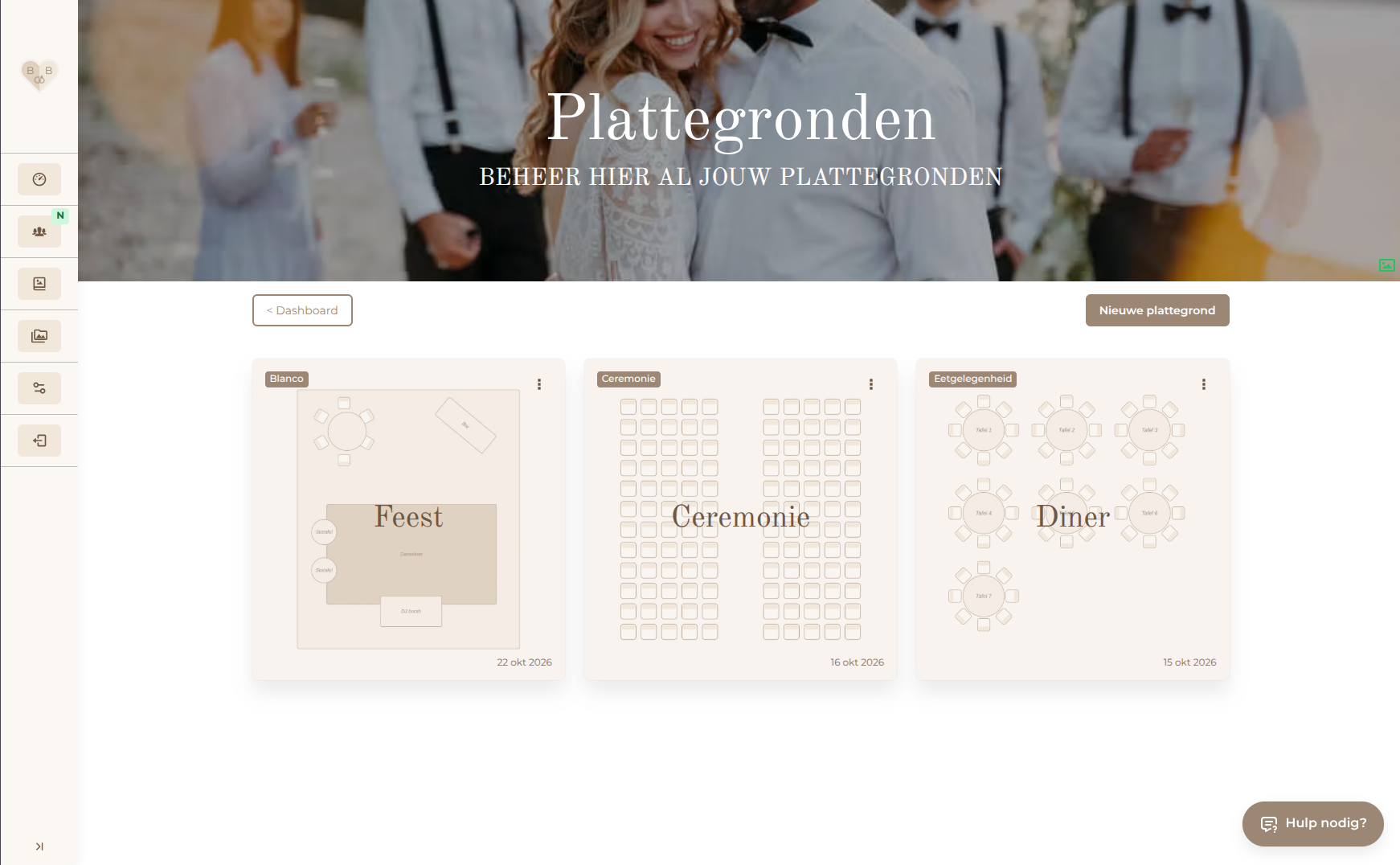
What is different about those two layouts in practice is covered in seating guests at the ceremony and a wedding seating plan in 5 steps.
This is something you can test yourself, and that is what a free trial is for. At the first table every tool feels smooth. How it handles change number twenty only becomes clear when you really try it.
The test you can do in ten minutes: set out five tables with the number of seats you will use, assign ten guests, then add a sixth table and mark one of those ten guests as not attending. If that takes a few clicks, you will also keep up with cancellations in the final weeks without any fuss. If you have to start over somewhere or recalculate something by hand, you find out now, while none of your planning is in that tool yet.
What to look for during that test:
You work in the tool; your venue and your suppliers don't. They want to see on paper who sits where, or how the room should look that morning. At our own wedding we retyped by hand what our suppliers needed to know. With a good export, you don't have to.
So ask about two export formats. The venue manager and the caterer use an Excel list with each guest's table and seat number to lay the tables. You use the same list to make place cards without retyping a single name. A PDF of the drawing shows where each table goes. If the tool also lets you draw in the decoration, that PDF looks more like the room as it will really be set up.
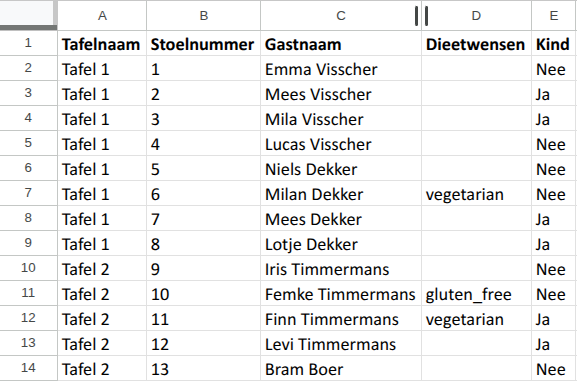
In BruiloftBuddy you export the floor plan with the buttons at the top right, as Excel or as PDF. The Excel file has one tab per floor plan, with the columns Table name, Seat number, Guest name, Dietary requirements and Child. That way the caterer sees per seat who eats gluten-free and where a children's meal needs to go. Empty seats are included as rows without a name, so you can also see which places are still free. The PDF shows the drawing, with names shortened by default. If you want to pass on exactly who sits where, send the Excel file along with it. If anything changes after that, export again, because an export does not update itself.
Also think of your master of ceremonies (ceremoniemeester), the friend who runs the day for you. On the day itself they want to be able to look up where someone sits, without calling you or using your password. So check whether you can invite them into the tool. In BruiloftBuddy you do that with "Invite a member". You set a role per person, and for a Helper you decide which sections they see, for example the floor plan.
Finally, for every tool, check whether the exports are part of the free version or only available after you pay. You usually only find out once your seating plan is finished and you want to send it on, and that is a bad moment to have to switch tools.
If your whole party sits at one long table and everyone picks their own seat, a sheet of paper is enough, especially if your guest list won't change any more.
For a small wedding with fixed seats, a downloadable template or a printed poster can also be enough. Those designs look better than anything you put together in a tool yourself, and on an easel by the entrance they look better than a printed PDF. They just don't remember anything. Every change means filling it in again and printing it again, so if your guest list is still moving, you will soon be printing your third version.
Many couples make their seating plan in Excel or Google Sheets, and as a list per table that works well. Anyone can open a file like that, and sorting by table is one click. But you can't see the room, and you have to copy the names from your guest list yourself. If someone cancels, you update it in two places.
Seating comes once your guest list is in order and most RSVPs are in. It is better to choose your tool earlier: where your guest list lives decides how many names you will be retyping later.
We ran into this ourselves. Our seating plan was in Excel, separate from the guest list and the RSVP replies. That is why the BruiloftBuddy floor plan is linked directly to the guest list. You can see what else it includes on the floor plan in BruiloftBuddy.
Try BruiloftBuddy free for 7 days and do the ten-minute test with ten names from your own guest list. Not sure where to start? Getting started with BruiloftBuddy walks you through the first steps.

Demi Mol
Demi Mol got married in 2024 and, while planning her own wedding, noticed that the organisation could be a lot smarter and clearer.
Drawing on her background as a project manager, she now uses that experience to build the ultimate structure and planning method for BruiloftBuddy: exactly the overview she was missing herself.
Try it yourself
Build your own wedding website
The editor on the homepage is the real editor, not a video. You see what you're making straight away.
Open the editorDemi Mol
Demi Mol got married in 2024 and, while planning her own wedding, noticed that the organisation could be a lot smarter and clearer.
Drawing on her background as a project manager, she now uses that experience to build the ultimate structure and planning method for BruiloftBuddy: exactly the overview she was missing herself.
Try it yourself
Build your own wedding website
The editor on the homepage is the real editor, not a video. You see what you're making straight away.
Open the editorFor the drawing, often yes, and the free tools from the big planning platforms cover the basics well. Pay particular attention to what happens when your guest list changes. If the tool doesn't know your guests, you update every change twice. Also check whether you can export the layout for free in a format your venue can use.
Ideally as soon as you start your guest list, because a linked tool takes its guests from there. You only do the seating itself once most RSVPs are in, around six weeks before the wedding. If you switch tools at that point, you have to move your whole guest list over again.
Yes. You copy the fixed layout of the room once and assign guests to it. You then mainly use the tool to keep track of who sits where and to pass that on to whoever sets the tables. Ask your venue for their own floor plan, and copying it is just a matter of putting the tables in the right place.
It is easier, because both layouts then come from the same guest list. If you work with two separate systems, you process every cancellation in both. Forget one, and there is a reserved chair at the ceremony for someone who isn't coming.


