Rowin Mol · October 1, 2026 · (2 months ago) · 8 min reading time · updated Nov 19
In short
Your photographer delivers in a few weeks' time. Your guests are photographing everything that very evening, and otherwise you never get to see those photos.
Short answer: a QR code on the table or on a sign links to an online photo album. Guests scan it with their normal camera and upload straight from their phone. Nothing to install.
What happens to those photos next depends on the solution. With ours, your gallery has three settings: open, closed for review, or open to the public. While guests upload, you can also choose that they don't see each other's photos, so it stays a surprise. You select who sees what yourself and put that selection on a screen via a unique URL. The gallery sits in the same system as your guest list and your wedding day timeline, so there is no separate app or extra spreadsheet alongside it.
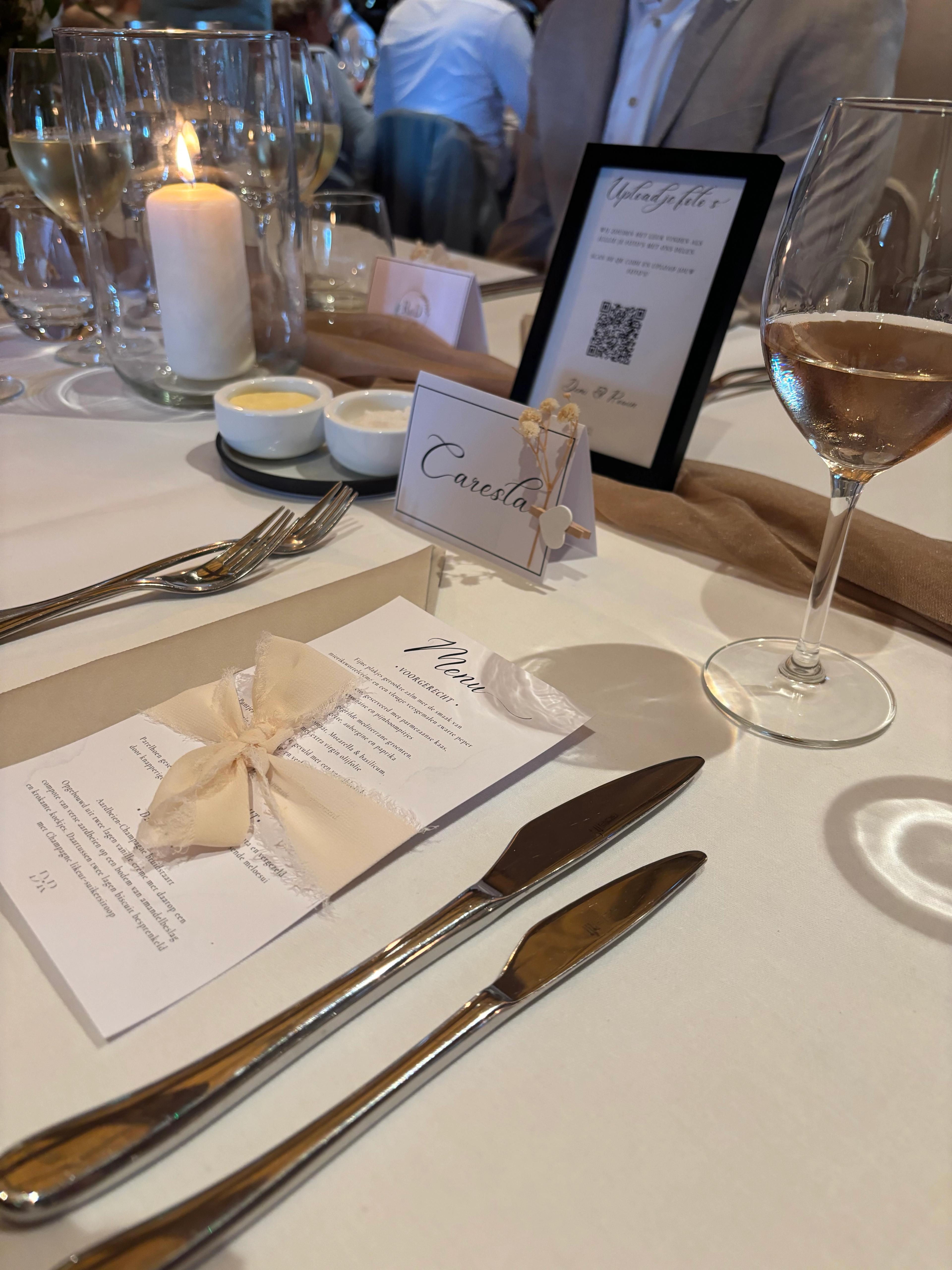
The technology behind it is less exciting than it sounds. A QR code is a link to a website in a pattern of little squares. Any modern phone camera reads it, a bar appears on screen, the guest taps it and lands on an upload page.
All you need to do is this:
Guests don't need to create an account or download anything. That last point matters more than it seems. Ask someone at a party to install an app and some of them give up at the login screen. A page that opens straight away doesn't have that hurdle.
One more thing to know: a QR code isn't tied to the day itself. The same code still works the morning after, and the week after too. Guests who only go through their camera roll at home can still upload. So for a wedding spread over several days, or with a brunch the day after, the album keeps filling up for days.
Couples usually try one of these three first, and all three do something well.
The WhatsApp group already exists and everyone knows how to use it. But these apps compress whatever passes through them, so you are left with small files you can't print much from later. And the photos are mixed in with the messages, the voice notes and the question of whether anyone has a spare charger.
A shared cloud folder does keep the quality intact and is free if you already have such an account. It usually comes with a login screen, though, and guests see each other's uploads straight away. Try opening a folder, choosing upload and tapping the right photos at a party with a glass in your hand.
Stand-alone photo-sharing apps are strongest here. They are built for exactly this, the upload flow is slick and it looks polished. If you only want to solve this one piece, they are a good fit. The flip side is that you add a tool with its own account and its own subscription, and the photos end up somewhere other than the rest of your planning.
That is why our photo gallery sits in the same system as everything else. You create the album where you are already working, and the wedding stays in one place. Read more on the page about the online wedding photo gallery.
This is the question most couples only think about once the first photos come in. By then you want to have found that setting already.
There are two things you want to control separately: what guests see of each other's photos during the day, and what goes out afterwards.
During the day. When setting up uploads, you can choose that guests don't see each other's photos. Everyone still contributes, but nobody can watch the stream. That sounds stricter than it feels. The album stays closed until the two of you open it together. Nobody scrolls through it between courses. If you would rather have a wall where everything appears straight away, switch that setting off.
Afterwards. The album has three settings. Open, so anyone with the link can get in. Closed for review, so you go through it first before anyone else sees anything. Or open to the public, if you want to share it more widely. You move from one setting to another without sending round a new link.
On top of that, you select who sees what yourself, and put that selection on a screen via a unique URL. You need that if there is a TV or a projector in the room where you want images to rotate, without every photo that comes in immediately appearing at full size.
One code at the entrance isn't enough. People walk past, think "later", and never come back to it.
Repeat it in places where people stand still or sit down anyway:
Add one line of text explaining why. "Scan and share your photos with us" does more than a code with no explanation. And have the code printed large enough: stamp-sized on glossy paper is barely scannable in a dimly lit room.
This is the honest part of the story. In the middle of a party, guests have to remember to upload themselves, and that is a lot harder than the scanning.
When we got married ourselves, the BruiloftBuddy photo feature already existed. We really wanted to collect and share all our guests' photos, and in the end it worked out. But we did have to chase it: people don't think of uploading on their own.
Three things that help:
Mention it before the party starts. Put it in the invitation or on your wedding website, so it isn't a surprise on the day. Anyone who has read about it once will recognise the code when they come across it.
Let someone else ask. The master of ceremonies (ceremoniemeester, the friend who runs the day) or the DJ can mention it between two parts of the programme. From a microphone it lands better than from a card, and you don't have to do it yourselves.
Send one follow-up message. The day after, or a few days later, a message in the group with the link. At home on the sofa, with the camera roll open, people who were too busy on the day still get round to it. How to handle that follow-up without turning it into a second project is covered in the piece on collecting guest photos after the wedding.
Plan this for the same week your place cards and menu cards go to the printer. The code needs to be included in that print run, so your real deadline is weeks before the day itself.
You can set up an album and test the code within the seven-day free trial. That way you see for yourself how it scans before you spend anything.

Rowin Mol
Rowin Mol is the founder of BruiloftBuddy. He got married in 2024 and, while planning his own wedding, found that on top of the tools he was using he still needed a separate spreadsheet for the guest list, attendance and the wedding day timeline.
Out of that frustration he built BruiloftBuddy: the platform he wished he'd had himself.
Try it yourself
Build your own wedding website
The editor on the homepage is the real editor, not a video. You see what you're making straight away.
Open the editorRowin Mol
Rowin Mol is the founder of BruiloftBuddy. He got married in 2024 and, while planning his own wedding, found that on top of the tools he was using he still needed a separate spreadsheet for the guest list, attendance and the wedding day timeline.
Out of that frustration he built BruiloftBuddy: the platform he wished he'd had himself.
Try it yourself
Build your own wedding website
The editor on the homepage is the real editor, not a video. You see what you're making straight away.
Open the editorNo. The code opens a web page in the browser guests already have on their phone. They scan it with the camera app that's already installed, with no download or account involved. A guest who sees the code can send in their first photo within a few seconds.
Yes, that's what the "closed for review" setting is for. Everything comes in, but nobody else sees it until you open the album. So you can go through it calmly whenever it suits you, for example the Sunday after.
Scanning works fine, because the camera does that on the phone itself. Uploading does need a connection. In a room with thick walls or an overloaded network, it can be slow. So ask about guest Wi-Fi in advance, and expect some uploads to arrive only once guests are home. The link keeps working after the wedding, so those uploads still come in.
No, and that isn't the aim. A photographer delivers the composed, well-lit images you'll still be looking at in twenty years. Guest photos show the day from the other side of the room, in moments when no photographer was around. Together they give you more of the day than either one on its own.


